








How to use Claude for copywriting: a guide for B2B SaaS marketers
A practical guide for B2B SaaS marketers on using Claude for copywriting: setting it up with your voice, briefing it properly, editing out the habits that make copy read as AI-written, and checking every fact before anything goes live.

Written by
SaaS Hackers- AI
- Claude
- Content Marketing
- Content & SEO
- Emerging Modern Challenges
- Guide

Quick answer: To use Claude for copywriting, give it what a good freelance copywriter would ask for on day one: your voice guide, real examples of copy you like, the facts it may use and a clear brief. Keep that context in a Claude Project or a Skill so you don’t repeat it, then edit every draft as a person and check every fact before it goes live.
Most B2B SaaS teams have tried Claude for copywriting by now, and most have had the same first result: copy that is fluent, tidy and a little hollow. It reads well enough until you notice it could sit on any competitor’s website, it has a confident statistic nobody can trace, and every third paragraph ends on a neat little line that sounds like a LinkedIn post.
That first result usually comes from a missing set-up, and the set-up is fixable.
Claude writes to the standard of the context you give it, and an empty chat window with “write a landing page for our product” gives it almost nothing. This guide covers the set-up that changes that: which Claude features to use for which job, how to give it your voice, how to brief it, how to edit out the patterns that give AI copy away, and how SaaS Hackers runs its own Claude writing process with checks a person can trust. It sits alongside our B2B SaaS content marketing guide, which covers what to write; this one covers how to write it with Claude.
What is Claude good at in copywriting, and where does it fall short?
Claude for copywriting means using Anthropic’s Claude models to research, draft, rewrite and edit marketing copy, with a person setting the brief and signing off the result. It is strongest on the parts of the job that take time but little judgement, and weakest on the parts that need facts or a point of view only your company has.
Where it earns its place:
- First drafts from a strong brief. Give it structure, sources and voice, and you get a draft worth editing in minutes rather than hours.
- Rewrites and variations. Turning a long page into a short one, a blog post into an email, or one headline into ten options to test.
- Editing to rules. Checking a draft against your style guide, tightening sentences, cutting filler and fixing spelling to British or American English.
- Working through source material. Pulling the points that matter from call transcripts, product docs or research before you write.
Where it needs you:
- Facts. Claude can produce a plausible statistic, quote or customer name that doesn’t exist. Every number has to come from a source you gave it or one you can open.
- Positioning. It doesn’t know why your buyers chose you over the alternative unless you tell it.
- Taste. It will write a competent version of what you asked for. Deciding whether that’s the right thing to say is still the job.
If you’re weighing Claude against other assistants for this work, our comparison of Claude and ChatGPT for B2B content goes through the differences. The rest of this guide assumes you’ve picked Claude.
Which Claude features should copywriters use?
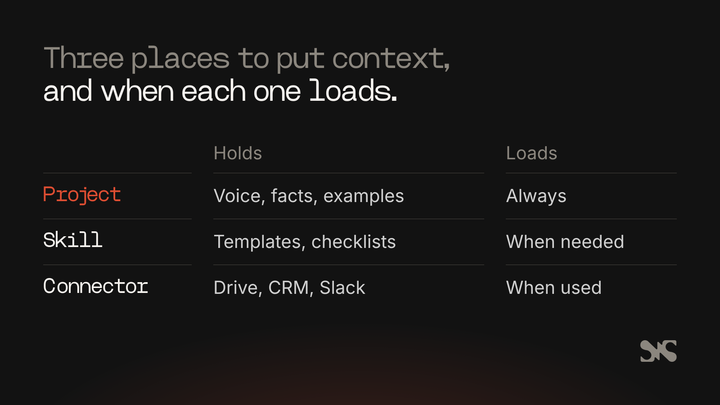
Claude gives copywriters four places to put context, and choosing the right one for each job is most of the set-up. Anthropic’s help centre describes them plainly: account-wide instructions, project instructions and knowledge, skills, and connectors (Anthropic, 2026). Each one loads at a different moment, so each suits a different kind of information.
Projects and project knowledge
A Claude Project is a self-contained workspace with its own chat history and knowledge base. You upload documents to it, set project instructions, and every chat inside the project starts with that context (Anthropic, 2026). For copywriting, a project per brand or per client is the natural unit: the voice guide, positioning, product facts and approved examples go into project knowledge once, and every brief you write inside it benefits.
Anthropic’s help centre says projects are available on every plan, with free accounts limited to five, and that paid plans switch to retrieval automatically when project knowledge gets large, expanding capacity “by up to 10x” (Anthropic, 2026). On Team and Enterprise plans, projects can be shared with colleagues as view-only or editable. Our explainer on how Claude Projects work covers the set-up step by step.
Skills
A skill is a folder of instructions, and sometimes scripts and reference files, that Claude loads only when a task calls for it (Anthropic, 2026). Anthropic’s own comparison is useful here: projects hold static background knowledge that’s always loaded, while skills hold procedures that switch on when needed and work across Claude. For copywriting, a skill is the right home for how you write rather than what you know: your template for a landing page, your editing checklist, your rules for meta descriptions.
Skills are written in Markdown, so nobody needs to code to make a simple one. On Team and Enterprise plans, an organisation’s owners can provision skills for every member, which is how a marketing team keeps one approved version of its writing process. Anthropic has also published the format as an open standard, so a skill isn’t tied to Claude alone. For examples built for marketers, see our piece on Claude Skills for marketing teams.
Instructions for Claude
Account-wide instructions apply to every conversation you have. They suit personal preferences that never change, such as “write in British English” or “never use em dashes”, and little else. Anything specific to a brand belongs in a project or a skill, or it will leak into work for another brand.
Connectors
Connectors let Claude reach other tools: Google Drive to read your documents, Slack, project management tools, and any service that runs a remote MCP server (Anthropic, 2026). Anthropic draws the line between the two clearly: MCP gives Claude access to tools, and skills teach it how to use them. For copywriters, the useful connectors are the ones that hold source material: the drive folder with your case studies, the CRM notes, the call recordings.
Claude Code for content at scale
Claude Code is Anthropic’s agentic tool that “reads your codebase, edits files, runs commands”, and runs in the terminal, IDE extensions, a desktop app and the web (Anthropic, 2026). It sounds like a developer’s tool, and it is, but it suits content work that lives in files: a folder of Markdown articles, a batch of meta descriptions, a site’s worth of alt text. It reads a CLAUDE.md file at the start of every session, can use skills, can run your own check scripts, and can run on a schedule. That’s the set-up SaaS Hackers uses, covered later in this guide.
How do you give Claude your brand voice?
You give Claude your brand voice the same way you’d brief a new writer: describe it in plain words, show it real examples, and explain the reasons behind the rules. Anthropic’s prompting guidance says examples are “one of the most reliable ways to steer Claude’s output format, tone, and structure” (Anthropic, 2026), and in practice they matter more than any adjective you put in a voice guide.
A voice guide that works with Claude has five parts:
- Who you’re writing for. The job titles, what they already know, and what they’re sceptical of. Our guide to training Claude on your ICP covers this part in detail.
- How you sound, with the reason. “Plain and direct, because our buyers are engineers who distrust marketing” gives Claude something to reason from. “Professional yet friendly” gives it nothing.
- Words you use and words you never use. Product names spelled the way you spell them, the terms your buyers use, and a banned list.
- Mechanical rules. British or American spelling, sentence case or title case, how you write numbers and dates, punctuation you avoid.
- Examples. Three to five pieces of real copy you’re proud of, each labelled with what it is and why it works. Add one or two you’d never publish, labelled as such.
Anthropic recommends explaining the reason behind an instruction because “Claude can generalize from the explanation” (Anthropic, 2026). A rule with its reason covers cases the rule never mentioned. It also recommends wrapping examples in tags such as <example> so Claude can tell them apart from instructions, and making them varied enough that Claude doesn’t copy one too closely.
Put the voice guide and examples into project knowledge, or into a skill if the same voice is used across several projects. Then test it: ask for a short piece, compare it with the examples, and change the guide where the draft drifts. For a worked template, see our piece on writing a brand voice guide for Claude.
How should you brief Claude for a piece of copy?
A good brief for Claude is the brief you’d give a capable freelancer who has never met your company. Anthropic’s “key test” puts it well: show the prompt to a colleague with little context, and “If they’d be confused, Claude will be too” (Anthropic, 2026).
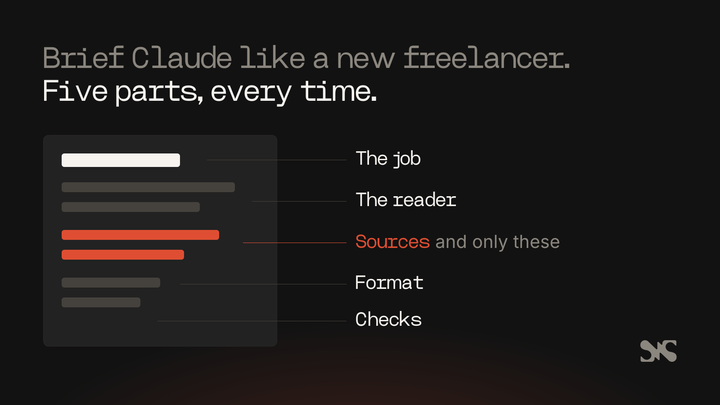
Every brief should cover:
- The job. What the piece is for and what the reader should do next. “A pricing page FAQ that answers procurement’s questions so sales calls start further along” is a job. “Write some FAQs” isn’t.
- The reader. Which buyer, at what stage, already knowing what.
- The sources. The documents Claude may take facts from, and the instruction that it may take facts from nowhere else.
- The format. Length, headings, structure, and where it will be published.
- The checks. What you’ll check the draft against, so Claude can check itself first.
Anthropic’s guidance adds three habits worth copying. First, say what to do rather than what not to do: “write in flowing paragraphs” works better than “don’t use bullet points”. Second, match the style of your prompt to the output you want, because a prompt full of headings and bullets tends to produce copy full of headings and bullets.
Third, when you give Claude long documents, put them at the top of the prompt, above the instructions, and ask it to quote the relevant parts before it writes (Anthropic, 2026). That last step does more for accuracy than any warning about making things up.
For long or repeated briefs, separate the parts with tags such as <context>, <sources> and <instructions>. Anthropic notes that wrapping each type of content in its own tag “reduces misinterpretation”.
What does a good Claude copywriting process look like?
A good Claude copywriting process has a person at each end and a check in the middle: a person writes the brief, Claude drafts, a person edits, a written checklist or script checks, and a person signs off. Claude speeds up the steps in the middle.
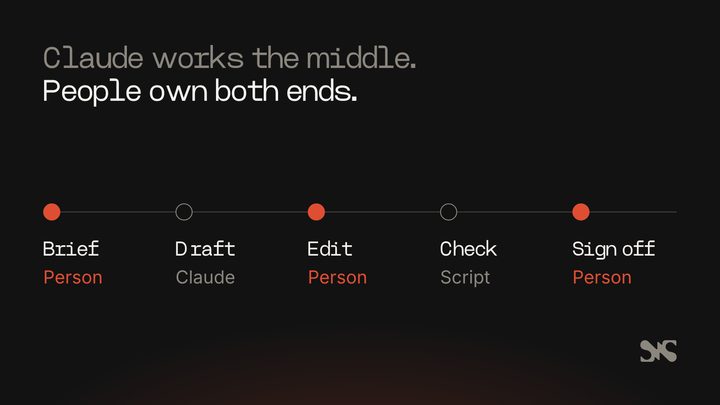
- Brief. A person writes the brief and gathers the sources. This is where most of the quality is decided.
- Draft. Claude drafts inside the project or with the skill loaded, quoting the sources it relied on.
- Edit. A person edits for argument, accuracy and voice. Ask Claude to explain any claim you can’t trace.
- Check. Run the draft against your checklist: banned words, punctuation rules, heading structure, link checks, meta lengths. A skill can do this inside Claude, and a script can do it outside. Our explainer on a Claude content audit skill shows what that check looks like.
- Sign off. A person who could defend every sentence in front of a customer approves it.
Two things make the loop work over time. Keep a running list of what you corrected in edits, and move each repeat correction into the voice guide or the skill, so the next draft doesn’t need it. And keep the check separate from the writing: a list of rules Claude is told to follow is weaker than a check that refuses a draft breaking them.
How do you stop Claude’s copy sounding like AI?
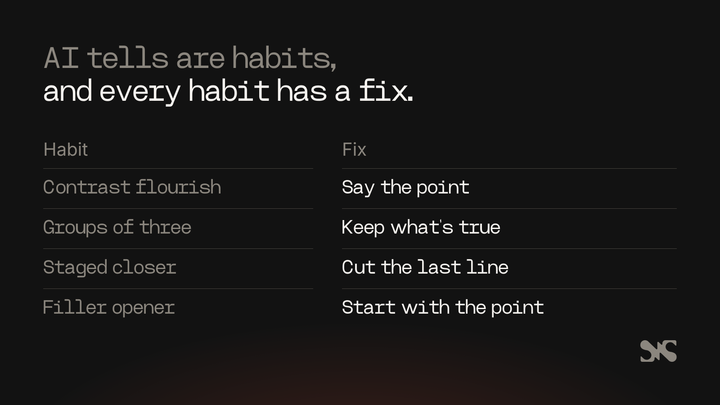
Copy reads as AI-written mostly because of a handful of structural habits, not because of any single word. Readers have learnt to spot them, and once they do, they trust the rest of the page less. The fix is to know the patterns by name, ban them in your voice guide, and check for them in every edit.
The patterns that give copy away most often:
- The contrast flourish. A sentence that sets up something the reader never thought and knocks it down, to make the real point sound bigger. Say the real point directly.
- Groups of three. Lists of three adjectives or three short clauses, used for rhythm rather than because there are three things. Keep the items that are true and distinct, however many that is.
- The staged closer. A short, quotable line at the end of a paragraph that restates what the paragraph already said. Cut it and see if anything is lost.
- The filler opener. Openings that set the scene in general terms before saying anything. Start with the point.
- The em dash habit. Dashes used where a comma, colon or full stop would do. Many teams now ban them outright, which is simpler to check than a judgement call.
- Inflated significance. Calling a feature a shift in how an industry works. Say what it does and for whom.
- Bold labels on every bullet. Lists where every item opens with a bold phrase and a colon, whether or not the label adds anything.
- Overused words. Every team that edits AI copy builds a list of words it sees too often. Keep yours in the voice guide and add to it every time an editor sighs.
Two things help beyond the list. Ask Claude to vary sentence length on purpose, because uniform medium-length sentences are a tell of their own. And edit from the reader’s side: if a sentence could appear on a competitor’s website unchanged, replace it with one that could only appear on yours, usually by adding a specific product detail, customer type or number from your sources.
How do you stop Claude inventing facts?
You stop Claude inventing facts by giving it the facts, telling it those are the only ones it may use, and checking every number, quote, name and link before you publish. A model that rarely invents things is still not one you can publish unchecked.
Rules that hold up in practice:
- Facts come from sources, not memory. Give Claude the case study, the product page or the report, and tell it to use nothing else. If a point needs a number you don’t have, make the point without one.
- Ask for quotes first. Anthropic suggests asking Claude to quote the relevant parts of long documents before it carries out the task (Anthropic, 2026). The quotes show you where each claim came from.
- Leave a visible gap. Tell Claude to write a placeholder such as “[NEEDS SOURCE: churn figure]” rather than fill a gap. A placeholder is easy to search for before anything is published.
- Never let it write quotes or testimonials. Customer quotes come from customers, word for word, with permission.
- Open every link. Check that each link loads and says what the anchor text promises.
- Check numbers mechanically where you can. If the copy is built from a known set of inputs, a script can confirm every number in the draft appears in those inputs. SaaS Hackers does exactly this, as the next section but one explains.
Does Claude-written copy hurt SEO or AI search visibility?
Copy written with Claude hurts SEO when it’s thin, generic or published at scale to game rankings, the same as any other copy. Google’s guidance says its focus is “on the quality of content, rather than how content is produced”, and that “Appropriate use of AI or automation is not against our guidelines” (Google Search Central, 2023). The same guidance says using automation “to generate content with the primary purpose of manipulating ranking in search results” breaks its spam policies.
Google also suggests disclosing AI involvement where readers would reasonably ask how a piece was made, and says giving AI an author byline “is probably not the best way” to do that (Google Search Central, 2023). The practical reading: a named person who edited and stands behind the piece should be the author.
For AI search, the same writing habits that help readers help citation. Open each section with a sentence that answers the heading’s question on its own, use specific names and numbers from real sources, and structure the page so each section stands alone. Our B2B SaaS SEO strategy guide covers how AI answers choose what to cite and how to measure it, and our AI search optimisation guide goes further.
How does SaaS Hackers use Claude to write and publish?
SaaS Hackers, which is run by the B2B SaaS marketing agency Team 4, writes and publishes with Claude through written processes stored alongside the website’s code. Three are worth describing, because each one shows the checks that make automated writing safe to publish.
The blog
A scheduled Claude task runs every two days. It picks the next piece from a backlog of 79 planned articles (13 of which are held back because they need input from a person), writes it with a copywriting skill, runs a content audit script, and then hands it to a publish script. The publish script refuses the article if it finds an em dash, a placeholder left in the copy, a wrong address, a meta title or description over length, fewer than three internal links, or any internal link that doesn’t load. The post publishes straight away and a person checks it afterwards.
Expert profile write-ups
Claude wrote a write-up and a set of questions and answers for each of the 165 expert profiles on the site, using only two sources per expert: what SaaS Hackers had already published about them, and what their own website said. A script then checked every write-up before anything was saved: no dashes used as punctuation, no banned words, no scores, answers of the right length, and every number in the copy present in that expert’s source file. A number that couldn’t be traced stopped the save.
Translations
Every page on the site is also published in six other languages, translated by Claude through Anthropic’s batch API. Each translated sentence is checked for its placeholders, its length and em dashes before it is saved, and a sentence that fails stays in English.
What the three have in common
The pattern across all three is the same: Claude writes, a script enforces the rules a person would otherwise have to remember, and a person checks the output. The checks are simple: a list of things that must never reach the live site, written down once and enforced every time.
How should a marketing team set Claude up?
A marketing team should set Claude up so one approved version of the voice, the facts and the process is shared by everyone, and so nobody can skip the check. On Team and Enterprise plans that means shared projects and organisation-provisioned skills; on smaller plans it means a shared folder of documents everyone uploads from.
- One owner for the voice guide and skills. Changes go through that person, so the team doesn’t drift into five slightly different voices.
- A project per brand or product line. Knowledge for one shouldn’t leak into another. Agencies need this most.
- Shared skills for repeated formats. Landing pages, blog posts, emails, meta descriptions and editing checks each get a skill, provisioned to the team.
- A written list of what Claude may and may not do. For example: may draft and edit; may not publish, invent figures or write customer quotes.
- A named person signs off every piece. That person’s name goes on the byline.
What to automate and what a person must own comes down to how bad a mistake would be. Rewrites, variations, alt text, meta descriptions and first drafts are safe to hand over with a check. Positioning, claims about customers, pricing, anything legal and anything that names a competitor stay with a person.
Common mistakes when using Claude for copywriting
Starting from an empty chat. Without a voice guide, examples and sources, Claude writes the average of the internet. Set up the project before the first brief.
Describing the voice with adjectives. “Confident but approachable” produces nothing useful. Real examples and rules with reasons do the work.
Trusting fluent copy. The more polished a draft reads, the easier it is to wave through a number nobody can trace. Check facts hardest on the drafts you like most.
Fixing the same thing in every edit. If you correct the same habit twice, it belongs in the voice guide or the skill.
Publishing at volume without a check. Scale multiplies whatever is wrong with the process. Put a check that can refuse a draft between Claude and the live site before you turn up the volume.
Putting Claude on the byline. A person who edited the piece and stands behind it should be the author.
When should you bring in a copywriter?
Bring in a specialist B2B SaaS copywriter when the work depends on positioning, research or judgement you don’t have in-house: a new homepage, a category launch, messaging for a new buyer, or a library of case studies that needs real customer interviews. A good copywriter who works with Claude will also leave you with the voice guide, examples and skills that make your own Claude drafts better afterwards. Ask any copywriter you shortlist how they use AI, which checks they run, and who owns the facts.
About SaaS Hackers
SaaS Hackers is a community of B2B SaaS specialists sharing hands-on insights, built by marketers for marketers. It lists vetted B2B SaaS marketing agencies and freelancers alongside practical guides and ranked top lists. SaaS Hackers is run by Team 4.
To find someone who can write or edit your copy, compare our ranked list of the top B2B SaaS copywriters.
FAQs
Some common questions, answered
Is Claude good for copywriting?
Claude is good for copywriting when it has a clear brief, your voice guide, real examples and the sources it may use. It drafts, rewrites and edits quickly and follows written rules well. It still needs a person to set the positioning, check every fact and sign off the final copy before anything is published.
How do I get Claude to write in my brand voice?
Put a voice guide and three to five real examples of copy you like into a Claude Project or a Skill. Describe who you write for, how you sound and why, the words you use and avoid, and your mechanical rules. Test a short piece, compare it with the examples, and update the guide wherever the draft drifts.
Should I use a Claude Project or a Skill for copywriting?
Use a Claude Project for what Claude should know about one brand: positioning, product facts, approved examples and source documents. Use a Skill for how Claude should work on a type of task, such as writing a landing page or checking a draft. Many teams use both: a project per brand and shared skills for formats.
Does Google penalise content written with Claude?
Google says it rewards quality however content is produced, and that appropriate use of AI is not against its guidelines. Using automation mainly to manipulate rankings breaks its spam policies. Publish copy a person has edited and stands behind, disclose AI involvement where readers would expect it, and avoid mass-producing thin pages.
How do I stop Claude making up statistics?
Give Claude the sources that hold the numbers and tell it to use no others. Ask it to quote the relevant passages before writing, and to leave a visible placeholder where a figure is missing. Then check every number, name, quote and link yourself, or with a script that compares the draft against its sources.