








B2B SaaS website strategy: how to plan, build and improve your site
How to plan, build and keep improving a B2B SaaS website that turns the right visitors into pipeline. The pages that matter, choosing a CMS, design, accessibility, speed, tracking and cookie consent, and whether to build in-house or with an agency.

Written by
SaaS Hackers- Inbound Marketing
- Conversion & Website
- Guide

Quick answer: A B2B SaaS website strategy is the plan for what your site must do for buyers and for the business: explain the product, prove it works, and turn the right visitors into trials, demos and pipeline. It covers which pages you need, how they're organised, the platform you build on, and how you measure and improve the site after launch.
Your B2B SaaS website does more selling than anyone on your team. Most buyers read your homepage, product pages, pricing and customer stories long before they speak to sales, and self-serve buyers on a free trial may never speak to sales at all. The site is also how search engines and AI tools understand what you do and who you do it for.
This guide is for founders and marketing leads planning a new site, a rebuild or a serious round of improvements. It covers the jobs your site has to do, how to plan it, the pages that matter most, choosing a CMS, design and accessibility, speed, conversion, tracking and consent, and who should build it.
What is a B2B SaaS website strategy?
A B2B SaaS website strategy is a written plan that links your site to your go-to-market: who it's for, what they need to see, what you want them to do, and how you'll know it's working. It turns “we need a new website” into decisions you can brief, build and measure.
Without one, a website project drifts towards how the site looks. With one, every page has a job, an audience and a measure. That makes it far easier to brief designers and developers, to say no to pages nobody needs, and to judge the site on pipeline rather than on opinions in a meeting.
A good strategy document is short. It names the goals and the measures, the ideal customer profile and the buying group, the positioning and core messages, the sitemap and page templates, the platform, the tracking plan and who owns the site after launch.
What jobs does a SaaS website have to do?
A SaaS website has five jobs, and every page should do at least one of them well. Most weak sites fail because pages try to do all five at once, or none.
- Explain. Say what the product does, who it's for and the problem it solves, in the buyer's words, within the first screen of the homepage and every product page.
- Prove. Show that it works for companies like the visitor's: customer stories, named logos, reviews, security and compliance details, integrations.
- Convert. Give each visitor a clear next step that suits how ready they are: start a trial, book a demo, see pricing, download a guide.
- Get found. Be easy for search engines and AI assistants to crawl and understand, with pages that answer what buyers search for.
- Support customers and sales. Help existing users log in, find documentation and get support, and give your sales team pages they can send to prospects mid-deal.
Product-led companies lean harder on the convert job through sign-up and onboarding pages. Sales-led companies with large contracts lean harder on prove, because a buying group of several people will each look for different evidence before they agree to a call.
How do you plan a B2B SaaS website?
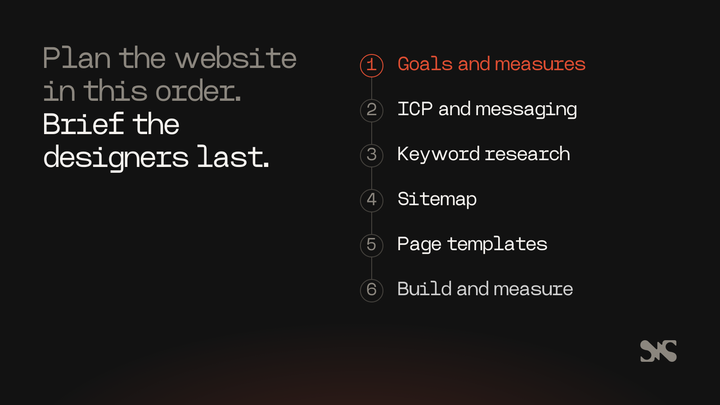
Plan a B2B SaaS website by working from the business goal backwards: goals and measures first, then the audience and messaging, then the pages, then the templates and build. Design comes after the plan.
Set the goals and the measures first
Write down what the site must deliver and how you'll measure it. For most SaaS companies that means a primary conversion (trial sign-ups or demo requests), a few secondary ones (pricing page visits, content downloads, contact forms) and the link from those to pipeline in your CRM. Agree these before design starts, because they decide what goes on every page.
Know your ideal customer profile and buying group
Your ideal customer profile (ICP) describes the companies you sell to best: industry, size, region, the tools they already use and the trigger that makes them look. Then list the people in the buying group and what each needs. A head of marketing wants outcomes, a technical lead wants integrations and security, and finance wants pricing and contract terms. Your site needs a page, or a section, that answers each of them.
Settle positioning and messaging before design
Agree your category, your main competitors, what makes you different and the three or four messages every page should support. Write them down in plain language. If the messaging isn't settled, designers end up designing around placeholder copy and the site launches with words nobody believes.
Use keyword research to decide which pages to build
Keyword research tells you which problems, use cases, integrations and comparisons buyers search for, and how they phrase them. Use it to decide the pages you need and what to call them, not to stuff words into copy. Our guide to B2B SaaS SEO strategy covers the research process in detail.
Build the sitemap and information architecture
The sitemap is the list of pages and how they nest. Most B2B SaaS sites follow a similar pattern: product (with features), use cases (by job, industry and team), pricing, customers, integrations, resources (blog, guides, templates), company (about, careers, contact) and a clear route to log in. Keep important pages within a click or two of the homepage, use short readable URLs, and plan your navigation labels in the buyer's words rather than internal team names.
Define page templates and components
Group pages that share a structure into templates: homepage, product, feature, use case, industry, pricing, comparison, integration, customer story, blog post, landing page. Then break templates into reusable components such as hero, logo strip, feature grid, quote, comparison table, FAQ and call to action. Building from components keeps the site consistent and lets your marketing team publish new pages without a developer.
Which pages matter most on a SaaS website?
The pages that matter most on a SaaS website are the ones closest to a buying decision: the homepage, product and feature pages, use case and industry pages, pricing, comparison pages, integrations, customer stories and the demo or trial sign-up page. Get these right before you spend time on anything else.
Homepage
The homepage has to tell a stranger what you do, who it's for and why it matters, then send them somewhere useful. Lead with a specific headline about the outcome, a short line on how the product delivers it, a primary call to action and proof close by. Below that, route people to product, use cases, pricing and customer stories.
Product and feature pages
Product pages explain how the product works. Show the interface, explain each main capability in terms of the job it does for the user, and answer the questions a careful evaluator would ask. One page per significant feature gives you space to go deeper and gives search engines a clear page to rank for that feature.
Use case and industry pages
Use case and industry pages show a visitor that you understand their world. Write each one for a specific team or sector: the problems they face, how the product fits their workflow, the integrations they'll need and proof from a customer like them. A page that just swaps the industry name into the same copy convinces no one.
Pricing page
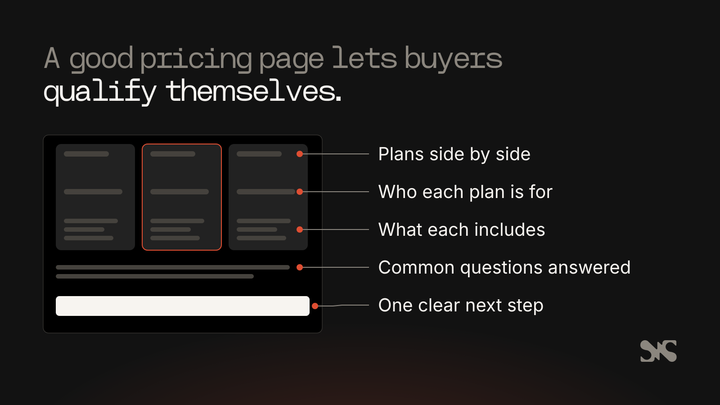
Buyers use the pricing page to qualify themselves: can we afford it, which plan fits and what's the catch? Show your plans, what each includes and who each is for. If you sell enterprise contracts without public prices, say what drives the price and what the buyer gets, then make the next step obvious. Add answers to the questions sales hears most: contract length, billing, security, support and what happens when a team grows.
Comparison and alternatives pages
Buyers compare you with competitors whether you help them or not. Comparison and alternatives pages let you frame that comparison honestly: who each product suits, where they differ and how switching works. Keep claims accurate and dated, because a comparison page with wrong facts about a competitor damages trust quickly.
Integrations pages
For many B2B SaaS products, integrations decide the shortlist. A directory of integrations, with a page for each important one explaining what syncs and how it helps, answers technical buyers' questions and often attracts search traffic from people looking for exactly that connection.
Customer stories
Customer stories prove the product works for companies like the visitor's. The best ones name the customer, describe the situation before, what changed and the results in the customer's own words. Tag them by industry, company size and use case so you can show the right story on the right page.
Demo and trial sign-up pages
This is where interest becomes pipeline, so remove anything that slows people down. Ask only for what you need, explain what happens next, and for demos let people book a time straight away if your process allows it. Our post on SaaS landing page best practices covers the layout and copy of high-intent pages in more depth.
How do you choose a CMS for a SaaS website?
Choose a content management system (CMS) by matching it to who will edit the site, how much custom development you can support, and how the site needs to connect to your CRM and product. The platform matters less than how well it is set up and who looks after it.
Traditional, all-in-one platforms
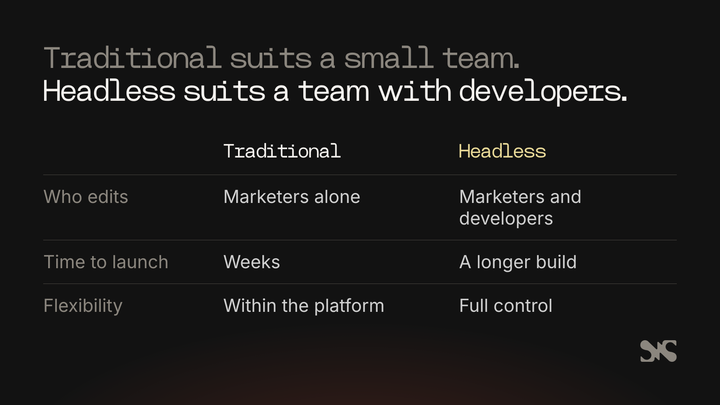
A traditional CMS manages both the content and the way pages are built and displayed. Website builders and hosted platforms in this group let marketers create and edit pages visually, and many include hosting, forms and basic SEO settings. They're usually the fastest way to launch and the easiest for a small team to run without developers. The trade-off is less control over code, performance and how content is reused elsewhere.
Headless CMS
A headless CMS stores content and serves it through an API, and a separate front end (built with a web framework) displays it. Content can be reused across the website, the product, documentation and other channels. Sites built this way can be very fast and flexible, and developers can use the same tools and processes as the product team. The trade-off is that you need developers to build and maintain the front end, and editors need a well set-up editing and preview experience to work without help.
How to decide
| Question | Points towards a traditional platform | Points towards a headless CMS |
|---|---|---|
| Who edits the site day to day? | Marketers with no developer support | Marketers backed by in-house or agency developers |
| How soon do you need to launch? | Weeks | You can plan a longer build |
| How complex is the content? | Standard pages, blog, landing pages | Content reused in the product, docs or several sites |
| How many languages or regions? | One or two | Several, with shared content |
| Who maintains it after launch? | The marketing team | A team with development time set aside |
Whichever you choose, check how it connects to your CRM and marketing automation, how forms are handled, how redirects and SEO settings are managed, and how you'd move away from it later. For a first-hand comparison of two popular options, read HubSpot CMS vs Webflow.
Design, accessibility and speed
Good SaaS website design makes the product easy to understand and the next step easy to take, for every visitor, on any device. That means a consistent design system, accessible components and fast pages.
Design from a system, not page by page
Start with a style guide: colours, type, spacing, buttons, forms and how images and product screenshots are treated. Then design the components and templates from your plan, using real copy rather than placeholder text. Show the product as it really looks, because buyers trust real interfaces more than abstract illustrations.
Build to WCAG 2.2 AA
The Web Content Accessibility Guidelines (WCAG) are the international standard for accessible web content. WCAG 2.2 was published on 5 October 2023 and updated on 12 December 2024, with success criteria at three levels: A, AA and AAA (W3C, 2024). Level AA is the sensible target for a SaaS website.
WCAG 2.2 added criteria that catch common problems on marketing sites. Keyboard focus must not be entirely hidden by things like sticky headers or cookie banners, and pointer targets such as buttons and links must be at least 24 by 24 CSS pixels unless they're spaced out or sit within a sentence (W3C, 2024). Check colour contrast, keyboard use, form labels, alt text on images and captions on video as part of every build.
Accessibility also has a legal side. The European Accessibility Act sets EU-wide accessibility requirements for certain products and services, including e-commerce and banking services (European Commission, 2026). If you sell in the EU, check whether any of your services fall within it.
Hit the Core Web Vitals thresholds
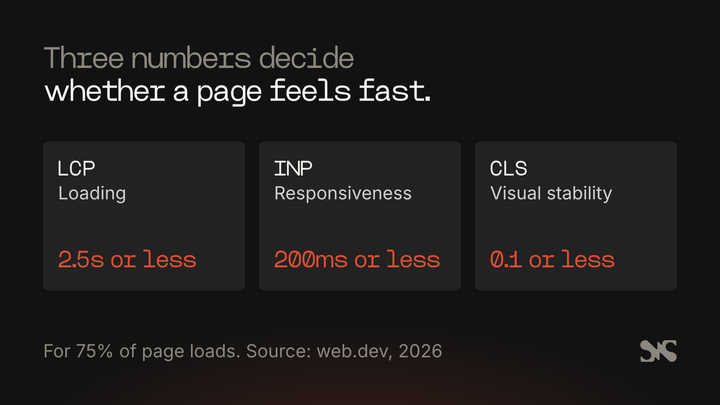
Core Web Vitals are Google's measures of loading, interactivity and visual stability. A page gives a good experience when Largest Contentful Paint (LCP) happens within 2.5 seconds, Interaction to Next Paint (INP) is 200 milliseconds or less and Cumulative Layout Shift (CLS) is 0.1 or less, measured at the 75th percentile of page loads on mobile and desktop (web.dev, 2026).
The usual causes of slow SaaS sites are large hero images and videos, too many third-party scripts (chat widgets, tracking pixels, testing tools) and heavy page builders. Compress and size images properly, load scripts only where they're needed and review the tag list every quarter.
Make the site easy for search engines and AI tools to read
Google says there are no additional technical requirements to appear in AI features such as AI Overviews and AI Mode, and the same SEO basics apply (Google Search Central, 2026). In practice that means content in the HTML when the page loads, clear headings, descriptive page titles and structured data where it fits. Check your robots.txt too: OpenAI uses OAI-SearchBot to show websites in ChatGPT search answers, and sites that block it won't appear in those answers except as navigational links (OpenAI, 2026).
How do you improve conversion on a SaaS website?
You improve conversion on a SaaS website by removing friction on the pages closest to a decision, matching calls to action to how ready visitors are, and testing changes against the conversion goals you set at the start. Our post on getting more leads from your website goes deeper on each tactic below.
- Offer the right next step. A first-time visitor reading a blog post is rarely ready for a demo. Give them a relevant guide or template, and keep the demo and trial buttons for product, pricing and comparison pages.
- Cut form fields. Ask for what sales needs to act. Enrichment tools and your CRM can often fill in company details later.
- Put proof next to the ask. A customer quote, logo strip or review score beside a sign-up form answers the “will this work for us?” doubt at the moment it matters.
- Say what happens next. Tell people who they'll speak to, how long it takes and what they'll see. A bare “Submit” button leaves them guessing.
- Fix what you can see. Session recordings and form analytics show where people hesitate or drop out. Start there before guessing.
Test changes properly. A/B tests need enough traffic to give a reliable answer, which many B2B sites don't have on most pages. Where traffic is low, make one clear change at a time to a high-intent page and compare conversion over a sensible period. Our B2B SaaS inbound marketing guide covers how the website fits into lead capture and nurture.
How should you set up analytics, tracking and cookie consent?
Set up analytics by planning what you'll measure before the build, tracking the actions that matter as key events, passing those through to your CRM, and asking for consent where the law requires it. Retrofitting tracking after launch almost always leaves gaps.
Plan your measurement before you build
Write a measurement plan alongside the sitemap: the conversions, the events behind them (form submissions, demo bookings, trial sign-ups, pricing page views, key button clicks), where each is recorded and who owns the report. Give it to your developers with the design files so tracking is part of the build.
Track key events and connect them to your CRM
In Google Analytics, a key event is an event that measures an action that's particularly important to the success of your business, and any event you collect can be marked as one (Google Analytics Help, 2026). You can create Google Ads conversions from those key events, which keeps the numbers consistent between the two tools. Most teams manage their tags through Google Tag Manager so changes don't need a developer.
Forms need the most care, because embedded forms from CRM and marketing automation tools often sit in an iframe or load in a way standard tracking misses. Our walkthrough on tracking HubSpot form submissions in Google Analytics shows one common set-up. Then make sure every form passes the source, campaign and page through to the CRM, so you can tie website conversions to pipeline and revenue. The B2B SaaS marketing operations guide covers attribution and data in detail.
Ask for cookie consent where the law requires it
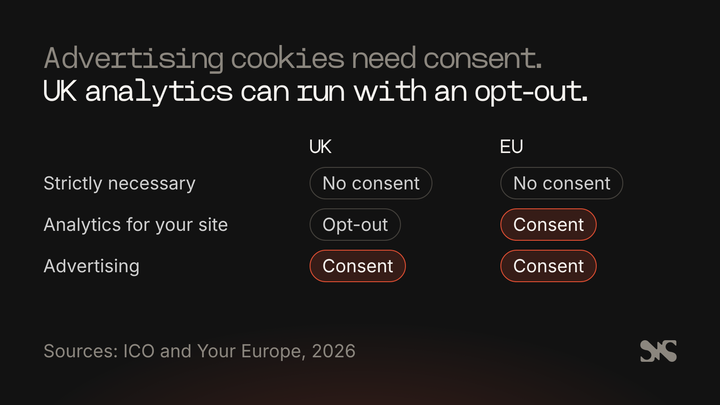
In the EU, cookies that are strictly necessary for a service the user asked for don't need consent, but tracking cookies for behavioural advertising, analytics or market research do, and they can't be set until the visitor has agreed (Your Europe, 2026). Visitors must be able to give separate consent for different purposes, and withdrawing consent must be as easy as giving it.
The UK rules have changed. The Data (Use and Access) Act 2025 lets you set some types of cookies without consent, such as those that collect information for statistical purposes and improve your website's functionality (ICO, 2026). To rely on the statistical purposes exception, the cookies must only be used to improve your own service, the result must be aggregate statistics you can't use to identify people, and you must give visitors a simple, free way to object (ICO, 2026). Advertising and cross-site tracking cookies still need consent.
If you use Google's tags, consent mode passes each visitor's choices from your cookie banner to Google so Analytics, Ads and other tags adjust their behaviour (Google Ads Help, 2026). Use a consent management platform that supports it, test that tags really wait for consent, and take legal advice on your own set-up.
Should you build your SaaS website in-house or with an agency?
Build in-house when you have developers and designers with time ring-fenced for the website. Use an agency when you don't, when you need specialist skills for a launch or rebuild, or when you need the work done faster than your team can manage.
In-house gives you control and keeps the website close to the product team. The common problems are time and continuity: product work usually wins over the website, and when the person who built the site leaves, the knowledge often goes with them. Document the build and keep editing simple enough for marketers. If you build in-house with an AI coding tool, our guide to building a website with Claude Code covers how to keep it on-brand.
An agency brings designers, developers and SEO specialists who build websites every week. The common problems are scope and ownership. Ask who will do the work and whether any of it is outsourced, get the scope and the support terms in writing, and make sure you own the code, the content, the domain and every account.
Many SaaS companies use both: an agency for the strategy, design and build, and an in-house marketer who owns the site after launch, with a support agreement for development work. Whoever builds it, a rebuild that changes URLs, templates or platforms can lose search traffic if redirects and on-page SEO aren't handled with care. If that's your situation, look at the best SEO migration agencies for B2B SaaS before you start.
Common website problems and how to fix them
The homepage doesn't say what the product does. Visitors leave when they can't work out what you sell. Rewrite the headline around the outcome for a named audience, add a line on how the product delivers it and show the product.
Every page pushes a demo. Visitors who aren't ready ignore the button and leave. Match calls to action to the page: guides and templates on early-stage content, demos and trials on product, pricing and comparison pages.
Nobody can tie the website to pipeline. Without source data on every form, the site's value is guesswork. Pass source, campaign and landing page into the CRM on every conversion and report on opportunities, not just form fills.
The site is slow on mobile. Heavy images and too many scripts push Core Web Vitals out of the good range. Audit third-party scripts, compress media and test on a mid-range phone, not just a fast laptop.
Only developers can make changes. When marketers wait weeks for a new landing page, campaigns slow down. Build from reusable components, train editors and keep a small list of approved page templates.
How do you keep improving your website after launch?
Treat launch as the start. The sites that keep producing pipeline are the ones with an owner, a regular review rhythm and a backlog of improvements ranked by their likely effect on conversion.
- Monthly: review conversions and conversion rate by page and source, check forms still work end to end, and fix broken links and errors.
- Quarterly: review Core Web Vitals and the tag list, refresh pricing and comparison pages, add new customer stories and integrations, and update pages that have lost search traffic.
- Yearly: revisit positioning, the ICP and the sitemap against how the business has changed, and decide whether templates or the platform still fit.
Keep a simple change log so you can link changes on the site to changes in results.
About SaaS Hackers
SaaS Hackers is a curated online resource and directory for B2B SaaS professionals, built by marketers, operators and product specialists who do the work. It brings together a hand-picked directory of agencies and individual experts with proven experience in B2B SaaS digital marketing, plus practical guides, templates and ranked lists.
If you're planning a new site or a rebuild and want specialist help, compare the top web design agencies for B2B SaaS and shortlist the ones that fit your stage and platform.
FAQs
Some common questions, answered
What should a B2B SaaS website include?
A B2B SaaS website needs a homepage that explains the product and audience, product and feature pages, use case and industry pages, pricing, customer stories, integrations, comparison pages and a demo or trial sign-up page. Add a blog or resources section and clear routes to log in and get support.
How long does it take to build a SaaS website?
It depends on the size of the site, the platform and how settled your messaging is. A small site on a visual website builder can launch in weeks once the copy is ready. A larger headless rebuild with many templates and integrations takes longer. Settling goals, messaging and the sitemap first is what keeps any timeline on track.
Should a SaaS company show prices on its website?
Showing prices helps buyers qualify themselves and cuts sales calls with poor-fit prospects, which suits self-serve and mid-market products. Companies selling large, custom enterprise contracts often don't list prices. If you don't, explain what drives the price, what each plan includes and how to get a quote, so the pricing page still answers buyers' questions.
Is a headless CMS better for SaaS websites?
A headless CMS is better for teams with developer support, content reused across several places or several languages, and a need for speed and flexibility. A traditional, visual platform is better for small marketing teams who need to launch quickly and edit pages without developers. The right choice depends on who will run the site after launch.
Do analytics cookies need consent in the UK?
Since the Data (Use and Access) Act 2025, UK websites can set some analytics cookies without consent, if they're used only to collect statistics that improve your own site, the results can't identify people, and visitors get a simple, free way to object. Advertising and cross-site tracking cookies still need consent. EU visitors are covered by stricter rules.