








The Claude Code tech stack for an agentic website
The tech stack, guard rails and agent workflows behind a marketing website that Claude Code helps build, run and improve, with people approving what matters. Written from the SaaS Hackers rebuild.

Written by
SaaS Hackers- Claude
- Technology
- AI
- Conversion & Website
- Emerging Modern Challenges
- Guide

Quick answer: An agentic website is a marketing site that AI agents help build, run and improve, while people approve the changes that matter. The stack that suits it keeps everything an agent touches in files it can read: a static site framework such as Astro, a headless CMS with its schemas in code such as Sanity, a host with deploy previews and scheduled functions such as Netlify, and Claude Code working through pull requests.
Most B2B SaaS teams now use AI to write copy. Far fewer let an agent change the website itself, and the ones that try often find out why the hard way: a platform built for clicking around a visual editor gives an agent nothing to read, nothing to test and no safe place to try things. What fixes it is a stack and a set of rules built for the agent from the start.
This guide sets out that stack, the guard rails that keep a live site safe, and the agent workflows that run on it. It's written from the rebuild of saas-hackers.com, which runs on Astro, Tailwind, Sanity and Netlify and was built with Claude Code. If you're still deciding what your website needs to do at all, start with our guide to B2B SaaS website strategy and come back for the build.
What is an agentic website?
An agentic website is a site where AI agents do much of the building and upkeep, inside rules that people set and checks that run every time. Agents write pages, fix links, refresh content and open code changes. People decide what the site is for, approve anything risky and check the results.
That's different from an AI website builder, which generates a site once from a prompt. On an agentic website the agent keeps working after launch, the way a developer and a content editor would, and every change it makes goes through the same review as a person's.
Three things make a site agentic rather than just AI-assisted:
- The agent can read everything that defines the site. Page templates, content types, design tokens, redirects and the rules themselves live in a code repository, not only in a dashboard.
- Every change can be tested before it's live, with a build that fails on a broken page, a preview link for every change, and a dry run for every content script.
- People hold the keys that matter. Merging code, publishing sensitive content and anything that costs money stay with a named person.
Why does the stack matter more when agents do the work?
The stack matters more because an agent can only work safely with what it can see and check. A person can spot that a page looks wrong in a visual editor. An agent needs that knowledge written down: as a schema that rejects a missing field, a check that fails the build, or a rule in a file it reads before every session.
A stack built for agents has four properties:
- Text over clicks. Configuration, content models and styles are files in the repository, so an agent can read, change and explain them.
- Fast, honest feedback. A build or test that fails loudly tells the agent it's wrong before a visitor does.
- Somewhere safe to try. Branches, drafts and preview links let an agent show its work without touching the live site.
- A single review gate. Every code change arrives as a pull request a person can read and merge or reject.
With these in place, the choice of model matters less. Without them, even a careful agent will break something eventually, because nothing tells it that it has.
What is the Claude Code tech stack for an agentic website?
The stack has five layers: a static site framework, a headless CMS, a host, the agent, and the review gate between them. Each layer is there because it gives the agent something to read or something to check.
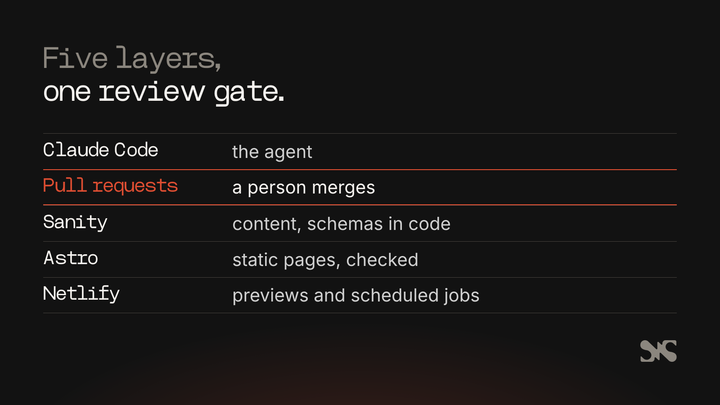
A static site framework: Astro
Astro builds pages ahead of time. By default it pre-renders every page, route and endpoint as static HTML at build time, and you opt individual routes into rendering on demand when they need it (Astro, 2026). For an agent, static output is a gift: the whole site exists as files after a build, so a script can check every page before anything goes live.
SaaS Hackers renders every page statically. The only page rendered on request is the draft preview, which editors open from the CMS to see unpublished changes. Everything else is checked at build time, and content is in the HTML on first load, including every item in a filtered list.
A headless CMS with schemas in code: Sanity
A headless CMS keeps content separate from the site's design, and serves it to the site through an API. The part that matters for agents is where the content model lives. In Sanity, a schema describes the types of documents and fields editors may author, and it's defined in code in the Studio's configuration (Sanity, 2026).
Because the schemas are code, an agent can read exactly what a blog post or a profile is made of, add a field through a pull request, and write content through scripts that the schema validates. Editors still get a visual editor. SaaS Hackers keeps every schema in the repository and never only in the dashboard, which is one of the rules in its project file.
A host with previews and functions: Netlify
The host gives the agent two things: a preview of every change and a place to run small jobs. Netlify builds a deploy preview automatically when a pull request is opened in a connected repository, at its own address, and adds a noindex header to it so search engines leave it alone (Netlify, 2026). That preview link is how a person checks an agent's change on a real page before merging.
Netlify's scheduled functions run like a cron job on a fixed schedule in UTC, only on the published production deploy, with a 30 second limit per run (Netlify, 2026). Short, scheduled jobs are a good fit for agentic upkeep: checking whether anything changed, then deciding whether to rebuild.
Claude Code: CLAUDE.md, skills, hooks and MCP
Claude Code is the agent. Four of its features turn a capable model into a reliable member of the team:
- CLAUDE.md. CLAUDE.md files are Markdown files that give Claude persistent instructions for a project, and Claude reads them at the start of every session (Anthropic, 2026). Shared through version control, the project's file holds the build commands, standards and rules everyone works to.
- Skills. A skill is a
SKILL.mdfile of instructions that Claude adds to its toolkit and uses when relevant. Unlike CLAUDE.md, a skill's body loads only when it's used, so long procedures cost almost nothing until they're needed (Anthropic, 2026). Our explainer on Claude Skills for marketing teams covers how they work for copy. - Hooks. Hooks are shell commands that Claude Code runs at set points, which gives you deterministic control: certain actions always happen rather than relying on the model to choose them (Anthropic, 2026). Use them for rules that must never bend, such as blocking edits to a secrets file.
- MCP servers. The Model Context Protocol is an open source standard for connecting AI tools to other systems, and MCP servers give Claude Code access to your tools, databases and APIs (Anthropic, 2026). That's how an agent reads analytics, rankings or a CMS directly instead of working from what you paste. Our guide to AI marketing agents and MCP covers the marketing tools you can connect.
Cloud sessions and scheduled tasks
A cloud session is a Claude Code session that runs on cloud infrastructure instead of your laptop, and it keeps running after you close the lid (Anthropic, 2026). Scheduled and triggered runs each start as a cloud session. That's what lets an agent publish a blog post at 01:43 or measure rankings on a Tuesday morning with nobody at a keyboard.
GitHub pull requests as the review gate
Every code change an agent makes lands on a branch and arrives as a pull request. The deploy preview builds from it, the checks run on it, and a person merges it or doesn't. On SaaS Hackers the rule is plain: agents open pull requests, and Darren merges them. No agent merges its own work.
How do you stop an agent breaking a live website?
You stop an agent breaking a live site by making the safe path the only path: a backup before any write, a dry run that shows the change, checks in every build, and limits on what it may change alone. None of these depend on the agent remembering to be careful. They're written into scripts, schemas and the build.
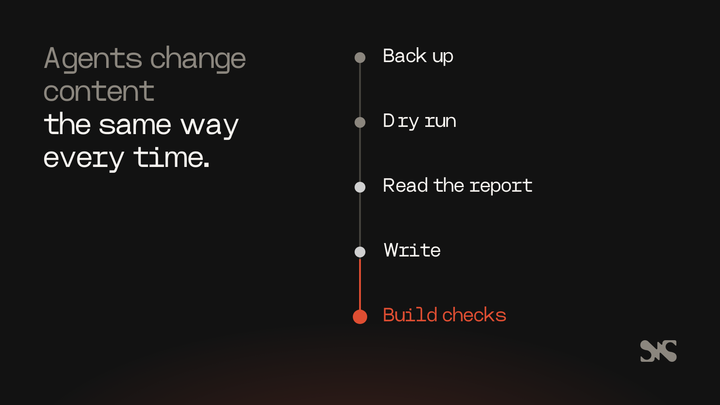
Back up, dry run, then write
Every script that changes published content on SaaS Hackers works the same way:
- Back up.
npm run backupexports the whole dataset to a dated file before anything changes. - Dry run. The script runs without
--write, checks everything and writes a report of what it would change. - Read the dry run. The agent, or a person, reads that report before going further.
- Write. Only then does the same script run with
--write. - Check. The site builds from published content and the route and schema checks run.
The handover after each job names the backup it took, so any change can be put back.
Locks in the CMS
Some mistakes are cheaper to prevent in the CMS than to catch later. In SaaS Hackers' Studio, a slug locks once its document is published, so a live address can't change by accident. A page can't be published at an address that has a live redirect, and new images can't be published without alt text. Scripts unpublish rather than delete, and leave other people's drafts alone.
Checks in every build
The build is the agent's most honest critic. On SaaS Hackers, npm run build stops if any of these fail:
- design tokens out of date, colours or sizes used outside the tokens, or text that fails contrast;
- a CMS section block with no matching page component;
- structured data that doesn't parse or misses its page type's schema, or a page without exactly one H1;
- language links (hreflang) that don't point both ways.
After a build, the route check confirms every in-scope live address returns a 200, and the parity check compares titles, descriptions, canonicals, headings and schema with the live site. Speed belongs in the checks too: our handbook entry on Core Web Vitals explains the measures worth watching.
Secrets stay out of the repository
Tokens and keys live in a local .env file that git ignores, and in the host's environment variables. The repository only keeps a list of their names. An agent can use a key that's in its environment without ever writing it into a file, a commit or a report.
Limits on what an agent may change alone
Decide in advance what an agent may do without asking, write it down, and enforce it in code where you can. This is how SaaS Hackers splits it today:
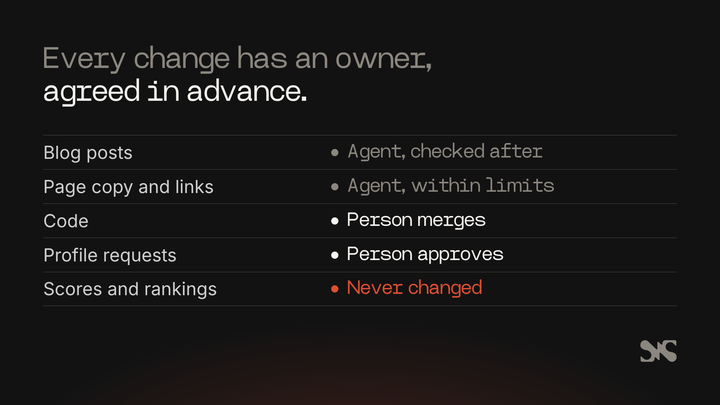
- Blog posts publish straight away, after the script's checks pass, and a person reviews them afterwards.
- Page copy, titles and internal links change through the SEO agent, inside fixed limits per run.
- Code changes go to a pull request that a person merges.
- Profile requests from agencies wait for a person to tap Approve in Slack.
- Scores, reviews and rankings are never changed by an agent or on request.
Cost limits
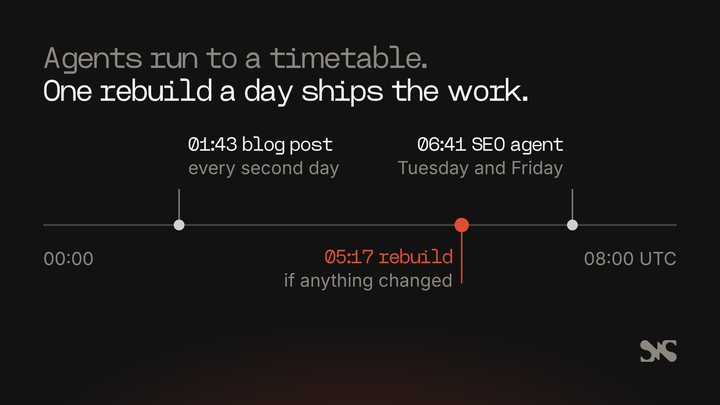
Agents can spend money quickly, so cost is a guard rail too. SaaS Hackers once rebuilt on every publish, and each production deploy costs 15 Netlify credits. Rebuilds are now limited to once a day: a scheduled function runs at 05:17 UTC and rebuilds only if something was published since the live build. The SEO agent's brief also says never to trigger a deploy itself.
What agent workflows run on an agentic website?
Once the stack and guard rails are in place, agents can take on the repeated work that usually slips: publishing, measuring, refreshing and translating. Each workflow has a written brief, a schedule, limits and a report.
Publishing a blog post every two days
A scheduled task writes and publishes one post from the content backlog every two days at 01:43 UTC, before the daily rebuild. It writes with a copywriting skill, checks the piece with a content audit skill, and then a publishing script refuses the post if it finds an em dash, a placeholder, a wrong slug, an over-long meta description, fewer than three internal links, or any internal link that isn't live. It only ever creates new posts and never changes an existing one.
An SEO agent that measures and acts twice a week
On Tuesdays and Fridays at 06:41 UTC, a fresh session measures rankings, scores the site against its goals and works down a ranked list of actions. Each run may change at most 8 pages, create 1 new list and add 30 internal links, with caps on paid data calls and translation spend. It records every change with a before-copy so it can be put back, sends code changes to pull requests, and reports to the team's Slack channel. Our comparison of Claude Code and AirOps for content teams looks at when this kind of setup beats a no-code tool.
Keeping directory profiles current
A monthly script checks every agency's website and records whether it works, has moved or is broken. A quarterly crawl reads each agency's own site and saves the facts it states, adding service and industry tags the site names but never removing one. Scores, reviews and rankings are never touched by either.
Requests approved in Slack
Agencies can ask to update their profile or apply to be listed. Each request is confirmed by email, checked by Claude against the agency's own website, saved as a CMS draft and sent to Slack as a card. Only an approved person can tap Approve, every click is checked against Slack's request signature, and each request can be decided once.
Translating every page
Every page on SaaS Hackers is also built in German, French, Spanish, Dutch, Japanese and Brazilian Portuguese. Claude Sonnet 5.5 translated the site through the Batch API for $91.35 in all, and later runs send only text that has changed. Quotes and what agencies say on their own websites stay in English, word for word.
How was SaaS Hackers built on this stack?
SaaS Hackers was rebuilt from Webflow onto Astro, Tailwind, Sanity and Netlify with Claude Code, in phases, each one a pull request that a person at SaaS Hackers reviewed and merged. The project file set the order, the rules and the commands, and a written spec set what “done” meant for each phase. The design side of that rebuild is in our guide to building a website with Claude Code.
The migration moved 233 posts and 172 expert profiles into Sanity as drafts first, then compared them with the live pages before anything was published. The SEO phase added a check that every page's structured data parses, and a parity check against the live site. By the time the new site replaced Webflow, the route check returned 494 of 494 live addresses, a build of 3,936 pages (English, the US version and six languages) took 8.5 minutes, and Lighthouse mobile performance scored 99 to 100 on the pages tested in production.
The same stack now carries the agent workflows above. Three things made that possible: a project file every session reads, scripts that refuse bad input, and a person who merges the code. If you want the marketing operations side of that picture, our guide to B2B SaaS marketing operations covers the data and tools around the site.
What are the benefits of an agentic website?
The benefits come from repeated work getting done on time, every time, with a record of what changed:
- Upkeep happens on time. Broken links, stale facts and missing meta descriptions get fixed on a schedule instead of in a yearly clean-up.
- Changes can be undone. Backups, before-copies and pull requests mean any agent change can be traced and reversed.
- There are fewer handoffs. One agent can change content, templates and checks in the same pull request, instead of passing work between a writer, a developer and an SEO.
- Running costs can be low on the right stack. SaaS Hackers' own cost review found no extra hosting plan fee for the new site, with the main cost to watch being Netlify credits for deploys.
Common problems with agentic websites, and how to solve them
The agent makes the same mistake twice. It has no memory of the last session. Write the rule into CLAUDE.md or a skill the moment you correct it, so every future session starts with it.
Changes look fine in code but wrong on the page. Without a preview, nobody sees the page until it's live. Require a deploy preview link in every pull request and check the page itself before merging.
Checks pass, but the site still drifts. Checks only catch what they test. When something slips through, add a check for it to the build so it can't happen again.
Costs creep up. Every rebuild, crawl and API call costs something. Put a limit in each agent's brief, batch rebuilds, and report spend in each run's handover.
Nobody knows what the agent changed. Ask for a handover after every job: what changed, the backup it took, the checks it ran and what it couldn't do.
What to look for if you hire help to build one
If you bring in an agency or developer to build an agentic website, ask to see the guard rails, not just the design. A good partner will show you:
- a project instruction file and the rules in it;
- content scripts with a dry run and a backup step;
- build checks that fail on real problems, with the commands to run them;
- a clear split between what agents may change and what a person approves;
- running costs in writing, including deploys and API use.
You can compare specialists on our list of the best web design agencies for B2B SaaS.
About SaaS Hackers
SaaS Hackers is a community of B2B SaaS specialists sharing hands-on insights, built by the people behind the growth: marketers, strategists and builders. It publishes guides, a handbook and top lists, and runs a directory of B2B SaaS marketing agencies and experts. SaaS Hackers is run by Team 4, a B2B SaaS marketing agency that is listed and ranked in the directory.
FAQs
Some common questions, answered
What is an agentic website?
An agentic website is a marketing site that AI agents help build, run and improve after launch, inside rules people set. Agents write content, fix links and open code changes, while every change passes checks and a person approves anything risky, such as merging code or publishing sensitive content.
What tech stack works best for an agentic website?
A stack that keeps everything in readable files works best: a static site framework such as Astro, a headless CMS with schemas in code such as Sanity, a host with deploy previews and scheduled functions such as Netlify, and Claude Code working through GitHub pull requests that a person reviews and merges.
Can Claude Code build a whole marketing website?
Claude Code can build and maintain a full marketing site when the work is split into phases, the rules live in a CLAUDE.md file, and a person reviews each pull request. SaaS Hackers was rebuilt this way, from Webflow to Astro, Sanity and Netlify, with every phase merged by a person.
How do you stop an AI agent breaking a live website?
Make the safe path the only path. Back up before every write, run each content script as a dry run first, run checks in every build, lock published addresses in the CMS, keep secrets out of the repository, and write down what the agent may change alone and what a person must approve.
Do you still need developers for an agentic website?
You still need someone who understands the code to set up the stack, write the checks and review pull requests. The agent does much of the building and upkeep, but a person who can read a pull request decides what reaches the live site and owns the rules the agent follows.