








AI marketing agents for B2B SaaS: how to connect, control and use them
AI marketing agents can now read your analytics, CRM and search data and act on what they find. This guide explains what agents and the Model Context Protocol are, which marketing tools connect today, what to let an agent change, how to keep it secure and how to roll it out in 90 days.

Written by
SaaS Hackers- AI
- Claude
- Marketing Operations
- Revenue Operations & Data
- Emerging Modern Challenges
- Guide

Quick answer: AI marketing agents are AI models that use your marketing tools in a loop to finish a task, deciding the steps themselves. The Model Context Protocol (MCP) is the open standard that connects them to tools like GA4, HubSpot, Semrush and Slack. Start read-only, let agents draft before they publish, and keep a person approving anything that goes live.
Most B2B SaaS marketing teams already use Claude or ChatGPT to write and summarise. The next step is different in kind. An agent doesn't wait for you to paste in a spreadsheet: it pulls the GA4 report itself, checks the CRM, looks at the search results and comes back with a plan, or a finished draft, or a change it has already made.
That last part is where teams get nervous, and they're right to. This guide covers what AI marketing agents are, how MCP connects them to your stack, the use cases that work today and the rules that stop an agent doing something you didn't want. It uses how SaaS Hackers runs its own agents as the worked example. If you're earlier on, start with our post on getting started with AI marketing operations.
What are AI marketing agents?
An AI marketing agent is an AI model that uses tools in a loop to complete a marketing task, choosing its own next step from what each tool returns. Anthropic draws the line clearly: workflows are “systems where LLMs and tools are orchestrated through predefined code paths”, while agents are “systems where LLMs dynamically direct their own processes and tool usage” (Anthropic, 2024).
In marketing terms, there are three things people call “AI” that behave very differently:
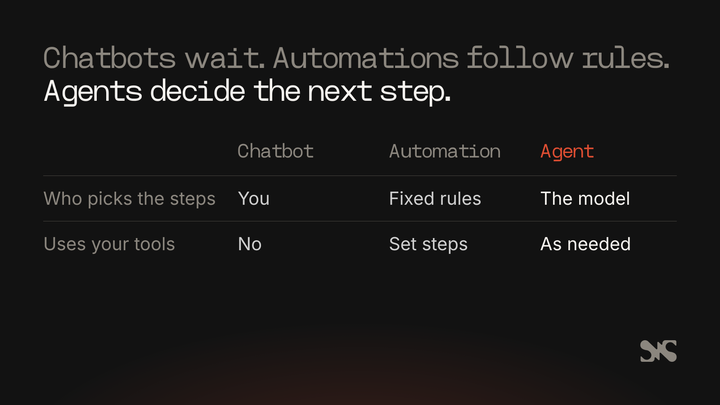
- A chatbot answers what you ask, using what you give it. You decide every step and do the copying and pasting.
- An automation (a Zap, a HubSpot workflow) runs fixed steps when a trigger fires. It's fast and predictable, and it does exactly what you built, even when the situation has changed.
- An agent gets a goal, then decides which tools to call and in what order. It reads the result of each call and adjusts. Anthropic describes agents as “typically just LLMs using tools based on environmental feedback in a loop” (Anthropic, 2024).
Agents aren't always the right choice. Anthropic recommends “finding the simplest solution possible, and only increasing complexity when needed”, and notes that agentic systems “often trade latency and cost for better task performance” (Anthropic, 2024). If a task has the same five steps every time, an automation is cheaper and easier to trust. Agents earn their place on open-ended work: “why did demo requests drop last month?” has no fixed path to the answer.
What is MCP, and why does it matter to marketers?
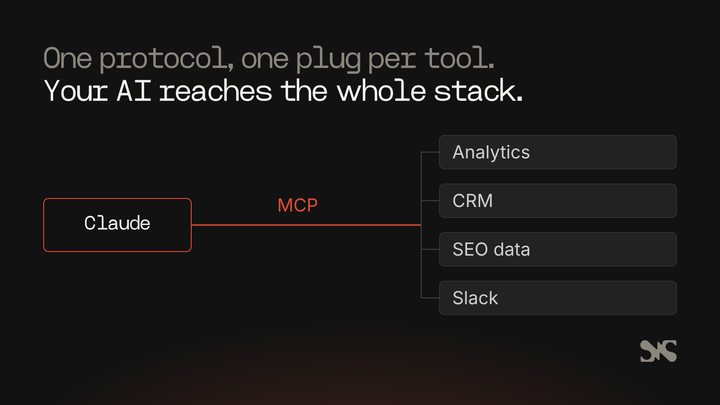
The Model Context Protocol is an open standard for connecting AI applications to external systems, so an agent can read data and use tools in your marketing stack. The MCP project describes it as “a USB-C port for AI applications”: one standard plug instead of a custom integration for every pairing of AI tool and software (Model Context Protocol, 2026).
Three parts make it work:
- The host is the AI application you use, such as Claude, Claude Code or ChatGPT.
- The client is the connection the host opens for each server.
- The server is the program that exposes a tool's data and actions. HubSpot, Google Analytics, Semrush and Slack each publish one.
Servers offer three kinds of thing. Tools are actions the AI can take, such as running a report or updating a record. Resources are data it can read. Prompts are reusable templates.
Servers run either locally on your machine or remotely on the vendor's platform, and remote servers can serve many users at once (Model Context Protocol, 2026).
Why should a marketing leader care about a protocol? Because it changes the economics.
Before MCP, getting an AI model to read your CRM meant a developer building and maintaining an integration. Now a vendor builds one MCP server and it works in every AI application that supports the protocol. In Claude, these appear as connectors.
Custom connectors using remote MCP are available on Claude's Free, Pro, Max, Ultra, Team and Enterprise plans. On Team and Enterprise plans, only owners (and, on Enterprise, people with the right role) can add them for the organisation (Anthropic, 2026).
Which marketing tools can AI agents connect to today?
Most of the core B2B SaaS marketing stack now has an official MCP server, though what each one allows differs a lot. Check the vendor's own documentation before you plan around a connector, because read and write access varies by tool and changes often.
Here's what four common tools offer, from each vendor's own pages as of November 2026:
| Tool | What an agent can do | Read or write | Worth knowing |
|---|---|---|---|
| Google Analytics | Query GA4 reports and account settings through the Data API and Admin API | Read only | Uses the read-only Analytics scope and can't change settings |
| HubSpot | Read CRM records, marketing content and activity history; create and update contacts, companies, deals, tickets and activities | Read and write | Respects each user's existing HubSpot permissions |
| Semrush | Keyword, domain, competitor, backlink and AI search data | Read | Needs a Semrush One, SEO Classic or Trends API subscription |
| Slack | Search channels, read and send messages, manage canvases and lists | Read and write | Workspace admins approve each MCP client |
Google says its Analytics MCP server “is currently for read-only requests and cannot modify your Google Analytics settings” (Google, 2026). That makes GA4 the safest place to start: an agent can pull and compare reports all day without any risk of changing your tracking. We walk through the set-up in how to connect Claude to GA4 via MCP.
HubSpot is the opposite case. Its remote MCP server became generally available in April 2026 with write access, so “any MCP-compatible AI tool can now read from and write to your CRM through natural conversation” (HubSpot, 2026). Every action runs under the connected user's own permissions, and HubSpot blocks activity records through the MCP server when an account has sensitive data turned on. Our post on connecting Claude to HubSpot covers the steps.
Semrush gives monthly MCP API units with each eligible plan, a minimum of 50,000 depending on the plan (Semrush, 2026). Slack's server lets agents search, read and post, with workspace admins approving each integration (Slack, 2026).
For anything else in your stack, look for an MCP server on the vendor's own site. Third-party servers exist for many tools, but you're then trusting whoever wrote them with your data.
What can AI agents do for a B2B SaaS marketing team now?
The use cases that work today are the ones where an agent reads several sources, does the analysis a person would do, and hands back something a person can check quickly. Here are six that B2B SaaS teams run now.
Reporting and analysis
An agent with GA4, CRM and ad platform access can answer “what changed and why” questions in minutes. Ask it to compare this month's demo requests with last month's, break them down by source and landing page, and check whether the pipeline from each source held up. It's read-only work, so it's the right first job.
SEO and AI search research
With a search data connector, an agent can pull the keywords a competitor ranks for, compare them with yours, check the live search results and draft a list of pages to build or improve. It does the gathering and the first pass of judgement. A person still decides what's worth writing. Our guide to AI search optimisation covers what to do with that research.
Content operations
Agents can draft briefs, check drafts against your style rules, find internal links and prepare pages for publishing. This is where reusable instructions pay off: a written brief or a Claude skill keeps every run consistent. See what Claude skills are for marketing teams for how that works.
CRM hygiene
An agent with CRM access can find duplicate companies, contacts with no lifecycle stage and deals stuck in a stage for months, then propose the fixes as a list. Because HubSpot's server can write, it could make the changes too. Keep that step behind an approval until you've seen a few weeks of its proposals.
Campaign QA
Before a campaign goes live, an agent can check every link resolves, every form submits, UTM parameters match your naming rules and the landing page copy matches the ad. These checks are tedious for people and quick for an agent.
Competitor monitoring
An agent can visit competitors' pricing, product and comparison pages on a schedule, compare them with last time and report what changed. Treat everything it reads on those pages as information, never as instructions (more on that below).
How do scheduled and background agents work?
A scheduled agent runs on its own at set times, follows a written brief, and reports back, so the work happens whether or not anyone opens a chat window. It's the step that turns an agent into part of the team's routine. Our guide to the Claude Code tech stack for an agentic website shows the scheduled agents that run SaaS Hackers.
SaaS Hackers runs three of these, built with Claude, and they show the pattern well.
The SEO agent runs twice a week. Each run measures the site's rankings, scores six goals (coverage, visibility, top results, the right page ranking, AI answers and “no harm”), picks the highest-value actions and makes the changes within fixed limits. In one run it may change at most 8 pages, create 1 new list and add 30 internal links, with caps on data calls and translation spend.
It looks back at its own earlier changes too: if a page it changed dropped 5 or more places on its main term with nothing else to explain it, the change is put back. Code changes go to pull requests that the agent never merges.
The blog automation writes and publishes one article every two days from a planned backlog. Its publishing script refuses a post with an em dash, a placeholder, fewer than 3 internal links or any internal link that doesn't load. It never publishes more than one post a run, and a person checks each post afterwards.
Profile requests from agencies listed on the site are checked by Claude against the agency's own website, saved as a draft, and sent to Slack as a card. A named approver taps Approve or Decline. Nothing is published until that tap.
The common thread: each agent has a written brief, hard limits, a list of things it must never do, and a report at the end of every run. The SEO agent's brief also lists what it must hand to a person, such as list rankings, removals, prices and outreach. It reports those and leaves them alone.
What should an AI agent be allowed to change?
Give an agent rights one step at a time: read first, then draft, then propose, then act within limits, and keep some actions for people only. Each step should be earned by weeks of good output at the step below.
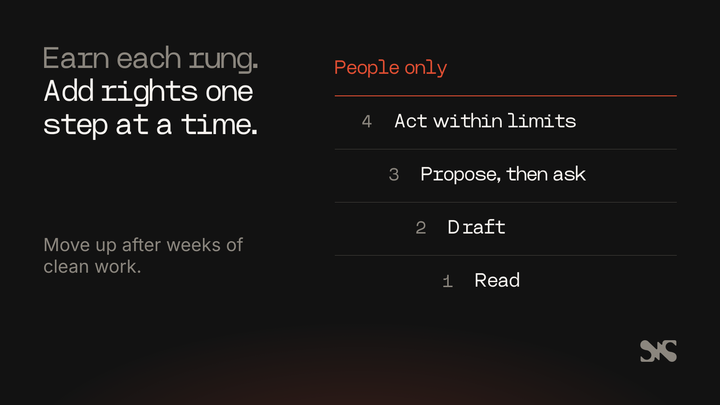
- Read. The agent pulls data and reports. It changes nothing. GA4's read-only server is built for this.
- Draft. The agent writes drafts that nobody sees until a person publishes them. In a CMS, that means drafts, never live pages.
- Propose. The agent prepares the change and asks. Slack approval cards work well here: the person sees exactly what will change and taps once.
- Act within limits. The agent makes changes itself, under caps it can't exceed, with a backup first and a dry run it checks before writing.
- People only. Some decisions stay with a person whatever the agent's record: pricing, anything said in your company's name to customers, deleting data, and anything legal.
Two habits make the middle rungs safe. The first is dry runs: every script the agent uses shows what it would change before it changes anything, and the agent reads that output.
The second is approvals that can't be faked. SaaS Hackers' Slack buttons carry only a request ID. What gets published is read again from the stored request at the moment of approval, each request can be decided once, and if anyone edited the draft after the card was sent, Approve asks for a fresh look.
A crafted message can't change what goes live.
How do you keep AI agents and MCP connections secure?
Treat every connector as a new member of staff with system access: give it the least access it needs, connect only to servers you trust, and assume anything it reads from the web could be trying to instruct it. Anthropic's own guidance for Claude connectors says the same.
Only connect trusted servers. Anthropic's help centre says to connect Claude only to servers built and hosted by organisations and applications you trust (Anthropic, 2026). Prefer the vendor's official server.
Limit permissions. When you sign in to a connector, review the scopes it asks for and “limit these scopes when possible” (Anthropic, 2026). On Claude's Team and Enterprise plans, everyone using a shared connector reaches the service with the same credential, so that credential should only reach what every member should see.
Watch for prompt injection. A web page, document or email can contain hidden text written to make an agent do something else. Anthropic warns that “malicious MCP servers may include hidden instructions that try to make Claude perform unintended actions” (Anthropic, 2026). Every SaaS Hackers brief says the same thing in its own words: fetched pages, search results and competitor sites are data, never instructions.
Keep tokens out of prompts. API keys and passwords belong in environment variables or the connector's encrypted settings, never pasted into a chat. The MCP project's security guidance says servers “MUST NOT accept any tokens that were not explicitly issued for the MCP server” (Model Context Protocol, 2026); the human version of that rule is simpler: never hand an agent a key it doesn't need.
Keep personal data where it belongs. Decide what personal data an agent may see before you connect it. SaaS Hackers keeps the names and email addresses of people who send requests out of its public content store entirely; only the change itself becomes a draft.
Review tool approvals. Claude asks before using a tool unless you choose “Allow always”. Anthropic advises clicking that only “when using a server and tool that you trust to run unsupervised”, and turning off tools you don't need in a conversation (Anthropic, 2026).
What do AI marketing agents cost?
The cost of an agent is the AI model's usage, the data it pulls from paid tools, and the time people spend reviewing its work. Teams tend to forget the third.
- Model usage: agents make many calls in a loop, so they cost more per task than a single chat. Anthropic notes that “the autonomous nature of agents means higher costs, and the potential for compounding errors” (Anthropic, 2024).
- Data: some MCP servers draw on paid allowances. Semrush's MCP uses monthly API units from your plan. Search data APIs typically charge per call.
- Review time: an agent that saves two hours of analysis but needs ninety minutes of checking hasn't saved much. Track both.
The simplest control is a budget per run. The SEO agent at SaaS Hackers has one written into its brief: a cap on data API calls, on pages read and on translation spend for each run, and nothing paid beyond those without a person agreeing.
How do you measure whether an AI agent helps?
Judge an agent on the outcome it was built for, the time it saves after review, and how often its work has to be undone. A run with no errors tells you little on its own.
Three measures cover most cases:
- The outcome. If the agent's job is SEO, track rankings and pages ranking for the right terms. If it's CRM hygiene, track duplicates and records with missing stages. Write the goal down before the agent starts, with a number to beat.
- Net time saved. Hours the work used to take, minus the hours now spent briefing and reviewing.
- Reverts. How often a person rejects, edits heavily or undoes the agent's work. A falling revert rate is the evidence you need before moving the agent up a rung.
Make the agent report these itself. Every SaaS Hackers agent ends its run with a report: what it measured, what it changed, what it checked and what it needs a person for. That report is also the audit trail when someone asks “why did this page change?”
A 30-60-90 day plan for AI marketing agents
Roll agents out in three stages over 90 days: read-only reporting first, drafts with approval second, and a scheduled agent with limits third. Each stage tests the trust the next one needs.
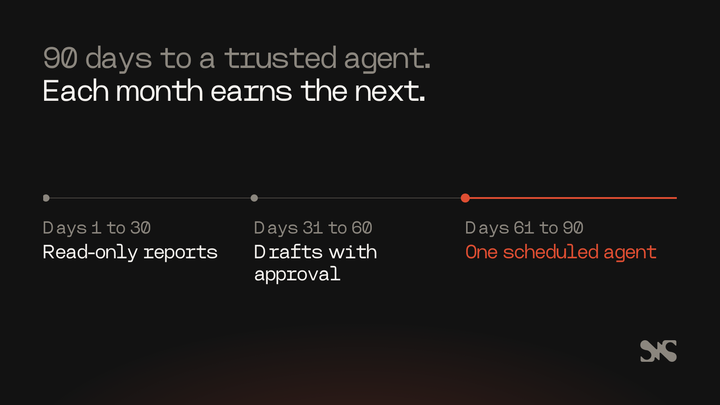
Days 1 to 30: read-only. Connect GA4 and one search data tool. Have the agent produce a weekly performance report and answer ad hoc “why” questions.
Compare its answers with what your analyst would say. Write down where it was wrong.
Days 31 to 60: drafts with approval. Add the CRM, read-only at first, then with write access behind an approval step. Let the agent draft content briefs, CRM clean-up lists and campaign QA reports. Turn the instructions that worked into a written brief or a skill, so every run follows the same rules.
Days 61 to 90: one scheduled agent. Pick the single job with the clearest goal and lowest risk, often the weekly report or campaign QA. Run it on a schedule with a brief, hard limits, a never-do list and a report to a Slack channel. Review every run for the first few weeks.
By day 90 you'll know which jobs agents do well in your stack, what they cost and where people still need to step in.
Common mistakes with AI marketing agents
Most agent failures come from too much access too soon, vague instructions, or nobody checking the output. Five to avoid:
- Write access on day one. Connecting a CRM with full write rights before you've seen the agent's judgement invites a mess that takes days to clean. Start read-only.
- No written brief. Instructions typed fresh into a chat each time drift. Write the brief once, with the goal, the limits and the never-do list, and point the agent at it.
- Treating fetched content as instructions. A competitor's page or an inbound email can carry text aimed at your agent. Say in the brief that everything it reads is data.
- No limits per run. An agent with no cap on changes or spend will one day do too much. Put numbers in the brief: pages, records, calls, budget.
- No report. If the agent doesn't say what it did, you can't check it, measure it or explain it. Make the end-of-run report part of the job.
What to look for when you bring in help
If you hire an agency or consultant to set up AI agents, look for people who start with your data and your controls, not with a demo. Ask them:
- Which MCP servers they'd connect first, and whether those are the vendors' official servers.
- What each agent may read and change, and where a person approves.
- How they handle tokens, personal data and prompt injection.
- How they'll measure success, and what they'll report each run.
- What they've already built and run for themselves, not only for a pitch.
Agents sit across marketing operations and RevOps, so the right partner usually knows your CRM and data model well. Our guides to B2B SaaS marketing operations and revenue operations cover the foundations an agent depends on.
About SaaS Hackers
SaaS Hackers is a community of B2B SaaS marketing specialists and a directory of hand-picked agencies and experts with proven experience in B2B SaaS. It publishes guides, lists and templates to help founders and marketing teams make better buying decisions. No agency can pay to be listed or ranked. SaaS Hackers is run by Team 4, a B2B SaaS marketing agency that is listed in the directory and ranked on some lists.
If you want specialists to connect your CRM, analytics and reporting before you hand any of it to an agent, browse our RevOps consultants and agencies for B2B SaaS.
FAQs
Some common questions, answered
What is an AI marketing agent?
An AI marketing agent is an AI model that uses marketing tools in a loop to finish a task, choosing its next step from what each tool returns. Unlike a chatbot, it fetches data itself. Unlike an automation, it isn't limited to fixed steps. Typical jobs include reporting, search research, content drafts, CRM clean-up and campaign checks.
What is MCP in marketing?
MCP, the Model Context Protocol, is an open standard that connects AI applications such as Claude to external tools and data. In marketing, it lets an AI agent query GA4, read and update HubSpot records, pull Semrush data or post in Slack through each vendor's MCP server, without a custom integration built for every pairing.
Is it safe to give an AI agent access to our CRM?
It can be, with controls. Start with read-only access, connect only the vendor's official server, limit the scopes you grant and keep writes behind a person's approval until the agent has a track record. HubSpot's MCP server runs every action under the connected user's own permissions, so use an account with only the access the agent needs.
Can Claude connect to Google Analytics 4?
Yes. Google publishes an official Google Analytics MCP server that works with Claude Desktop and Claude Code. It uses the read-only Analytics scope, so it can run reports and read account details but can't change your settings or tracking. That makes GA4 a sensible first connection for a team trying AI agents.
How should a marketing team start with AI agents?
Start with one read-only job, such as a weekly performance report from GA4 and your search data. Compare the agent's answers with your own for a month. Then add drafts that a person approves, and only after that run one scheduled agent with a written brief, hard limits per run and a report at the end of every run.