








B2B SaaS marketing operations: the guide to your stack, data and leads
Marketing operations is the work that keeps the tools, data and lead process behind your marketing honest. This guide covers what a B2B SaaS marketing operations function owns, how it differs from RevOps, how to set up GA4, attribution and consent properly, and a 90-day plan to get started.

Written by
SaaS Hackers- Marketing Operations
- Revenue Operations & Data
- Guide

Quick answer: B2B SaaS marketing operations is the function that runs the systems behind marketing: the martech stack, the data in it, the lead lifecycle and handover to sales, measurement and reporting, and consent. It matters because every campaign, report and forecast depends on it. When it's weak, budgets get decided on numbers nobody trusts.
Most SaaS companies don't decide to start marketing operations. It arrives by accident. Someone sets up HubSpot, someone else adds a form tool, a contractor installs Google Tag Manager, and two years later nobody can say why the MQL count jumped in March or which of the 40 workflows still matters.
This guide is for founders, heads of marketing and the first marketing ops hire in a B2B SaaS company. It covers what B2B SaaS marketing operations owns, how it fits with RevOps, how to audit a stack, how to run the lead lifecycle, the GA4 and Tag Manager basics, what attribution can and can't tell you, the consent rules, where AI fits, when to get help, and a 90-day plan to get started.
What is marketing operations in a B2B SaaS company?
Marketing operations is the team or person responsible for the technology, data, processes and measurement that marketing runs on. In a B2B SaaS company that usually means the CRM and marketing automation platform, the website tracking, the rules that turn a form fill into a qualified lead, and the reports the board sees. Our short definition of marketing operations is the version to share with a colleague who is new to the term.
The easiest way to picture it: marketers decide what to say and to whom, and marketing operations makes sure the machinery delivers it, records what happened and tells the truth about the result. A good marketing ops person spends less time pressing buttons in tools and more time designing the rules those tools follow.
In early-stage SaaS, marketing operations is often a part of someone else's job, usually the most technical marketer or a founder. That works until the company has more than one channel, more than one salesperson or more than one source of truth for revenue. After that point, problems pile up quietly: duplicate contacts, broken forms, leads that sit unworked, and dashboards that disagree with each other.
How is marketing operations different from RevOps?
Revenue operations (RevOps) joins up the operations of marketing, sales and customer success under one set of systems, data and goals. Marketing operations is the marketing part of that work. In a company with a RevOps team, marketing ops sits inside it or works very closely with it; in a smaller company, the marketing ops person often ends up doing early RevOps work because nobody else owns the CRM.
The practical split is about scope. Marketing ops owns everything up to the point a lead is accepted by sales, plus the measurement of marketing's contribution to pipeline and revenue. RevOps owns the full funnel: the CRM as a whole, deal stages, forecasting, renewals and the shared definitions every team reports against. If you're deciding which you need, our guide to revenue operations for B2B SaaS covers the RevOps side in depth.
One rule holds either way. The definitions that cross teams (what counts as a lead, an MQL, an SQL and an opportunity) have to be agreed and written down once, by both marketing and sales. Marketing ops is usually the team that keeps that document up to date.
What does a B2B SaaS marketing operations team own?
A marketing operations function in B2B SaaS typically owns eight areas. Small teams won't do all eight well at once, and that's fine. Knowing the full list helps you see what's being missed.
The martech stack
Choosing, setting up, connecting and retiring the tools marketing uses: CRM and marketing automation, the website CMS and forms, analytics and tag management, enrichment, ad platforms, webinar and event tools, and the integrations between them. Marketing ops also owns who has access to each tool and what each one costs.
Data quality
Keeping contact and company records clean, complete and free of duplicates. That covers required fields on forms, standard values for things like country and job function, enrichment rules, deduplication and a regular clean-up. Bad data breaks everything downstream, from lead scoring to attribution.
Lead management and routing
The rules that decide what happens when someone fills out a form or signs up for a trial: which record is created, which campaign gets the credit, who is notified and how fast. Routing rules decide which salesperson or team gets each lead, often by territory, company size or product.
Lifecycle stages
The stages a contact or company moves through from first contact to customer, the criteria for each move, and the timestamps recorded at each one. These stages are what funnel reports are built on.
Lead scoring
Rules or models that rank leads by fit (who they are) and engagement (what they've done), so sales spends time on the right people first.
Campaign operations
Building and checking emails, landing pages, forms, UTM parameters and audiences; running the campaign calendar; and making sure every campaign is set up so its results can be measured afterwards.
Reporting and attribution
The dashboards marketing is judged on, the definitions behind each number, and the attribution approach used to credit channels and campaigns with pipeline and revenue.
Compliance and consent
Cookie consent, email opt-in and unsubscribe handling, data retention and the paperwork with each vendor that processes personal data. This sits with marketing ops because marketing ops controls the tags and the forms.
How do you build and audit a martech stack?
A martech stack is the set of software marketing uses, plus the connections between the tools. The market is huge and still churning: chiefmartec counted 15,505 martech products in 2026, with 1,488 added and 1,367 removed in a year (chiefmartec, 2026). With that much choice, the hard part is keeping a small number of tools well set up and connected.
Start with an audit before you buy anything. A stack audit takes a few days and usually saves money straight away.
- List every tool marketing pays for or uses, including free ones and anything bought on a personal card. Note the owner, cost, renewal date and number of active users.
- For each tool, write down the job it does and the data it sends or receives. Draw the connections: where does a form submission go, and what happens to it next?
- Mark overlaps. Two tools doing the same job is common after a few years of growth, and one of them is usually half set up.
- Check each integration actually works. Submit a test form, start a trial, book a demo, and follow the record through every system.
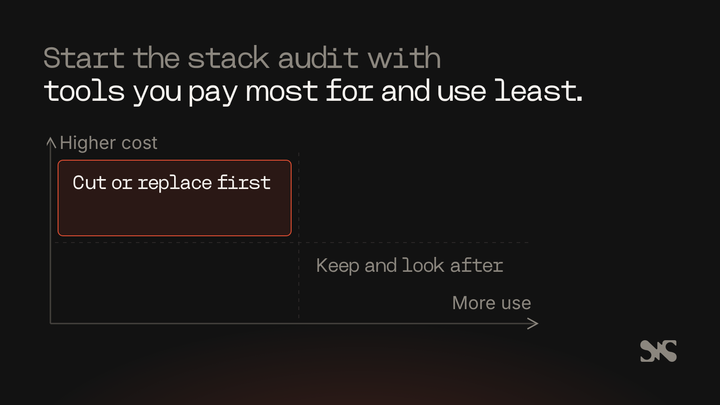
- Decide for each tool: keep, fix, replace or cut. Start with the tools that cost the most and get used the least, then put renewal dates in a calendar so decisions happen before the auto-renew.
For an early-stage company, the core of a stack is short: a CRM with marketing automation, a CMS with forms that write straight to the CRM, GA4 with Google Tag Manager, and a consent tool. Add tools only when a specific job can't be done with what you have. Our post on the lean B2B martech stack goes through one way to keep it small.
Write it all down. A short marketing ops handbook (what each tool is for, who owns it, how records flow, and the definitions behind each report) saves weeks every time someone new joins or an agency starts work.
How should the lead lifecycle and handover to sales work?
The lead lifecycle is the set of stages a person or company moves through, from first contact to paying customer, with clear entry criteria for each stage. HubSpot's default lifecycle stages are a common starting point: subscriber, lead, marketing qualified lead (MQL), sales qualified lead (SQL), opportunity, customer, evangelist and other (HubSpot, 2026). Other CRMs use similar stages under different names.
HubSpot defines an MQL as a contact or company “that your marketing team has qualified as ready for the sales team”, and a customer as one “with at least one closed deal” (HubSpot, 2026). The default stage property only moves forward when tools like forms, imports and workflows set it, so moving a record backwards takes a deliberate step. That's useful: it stops a returning customer being re-labeled a lead by a newsletter sign-up.
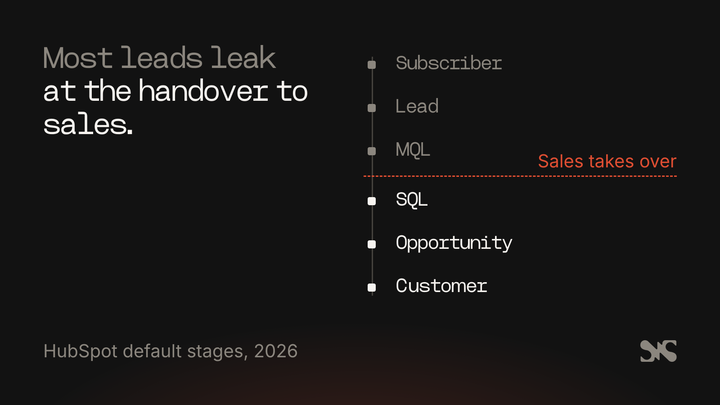
The stage that matters most is the handover between MQL and SQL. That's where leads leak. Four things make it work:
- Written criteria. Marketing and sales agree what makes an MQL and what makes an SQL, in plain words, and both sign off.
- Fast routing. Each MQL lands with a named owner straight away, with the reason it qualified visible on the record.
- A response agreement. Sales commits to a first response within an agreed time, and marketing commits to a volume and quality of MQLs. Both are reported weekly.
- A way back. Leads that sales rejects go back to marketing with a reason, so nurture can pick them up and the scoring can learn from them.
For product-led SaaS, add a product qualified lead (PQL) stage or property: someone using the free plan or trial in a way that predicts they'll buy. The criteria come from product data, which is one reason marketing ops and product analytics need to be connected.
Lead scoring that sales trusts
Lead scoring ranks leads so sales calls the best ones first. Most teams score on two things: fit (job title, company size, industry, country) and engagement (pricing page visits, demo requests, product usage). Keep the first version simple, with a handful of rules you can explain to a salesperson in one minute.
Treat a score as a way to sort leads, not a final judgment. Check it every quarter against what happened: did high-scoring leads turn into opportunities more often than low-scoring ones? If not, change the rules. Our guide to HubSpot lead scoring shows example criteria for B2B leads.
What are the GA4 and Google Tag Manager basics for marketing ops?
Google Analytics 4 (GA4) measures what people do on your website and app as events, and Google Tag Manager (GTM) is the tool most teams use to send those events without changing the website's code each time. Between them they produce most of the website data marketing ops reports on.
Events, key events and conversions
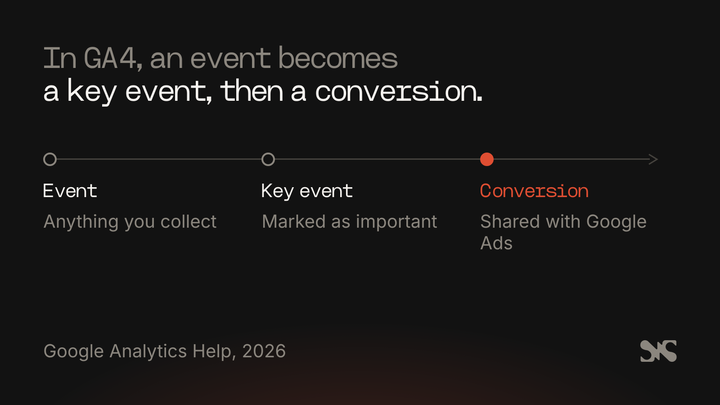
In GA4, everything is an event: a page view, a scroll, a form submission. An event that matters to the business is marked as a key event. Google renamed what used to be called conversions in GA4 to key events, so that “conversion” now means the same thing in GA4 and Google Ads (Google Analytics Help, 2026).
The flow Google describes is: event, then key event, then conversion. Any event you collect can be marked this way. You then create a conversion from it when you want to use it to measure and optimize ad campaigns, and it needs a linked Google Ads account (Google Analytics Help, 2026).
For B2B SaaS, Google publishes recommended events for lead generation, including generate_lead (when a lead is created, for example through a form), qualify_lead (when a user meets the criteria to become a qualified lead) and close_convert_lead (when a qualified lead becomes a customer) (Google for Developers, 2026). Using Google's names rather than inventing your own keeps reports readable and makes the later steps of the funnel easier to send back from the CRM.
A sensible starting set of key events for a SaaS website is short: demo request, trial or free plan sign-up, contact sales, and maybe a pricing page view or a high-intent content download. Mark too many events as key events and the reports stop meaning anything.
How Google Tag Manager fits in
Google describes Tag Manager as a tag management system that lets you set up and manage tags on your site without changing your website's code (Tag Manager Help, 2026). You add its code to every page once. After that you work in three building blocks:
- Tags: the code that sends data somewhere, such as a GA4 event or a LinkedIn or Google Ads tag.
- Triggers: the conditions that make a tag fire, such as a form submission or a click on a button.
- Variables: values the tags and triggers use, such as the page path or a form ID.
The whole set for one website is called a container. Marketing ops should own the container, keep it tidy, name things consistently, and publish changes with a short note on what changed and why. For a worked example, see our walkthrough on tracking HubSpot form submissions in Google Analytics with Tag Manager.
Web analytics or product analytics: what does product-led SaaS need?
Web analytics measures what people do on your marketing website, and product analytics measures what users do inside your product. In most SaaS companies they're owned by different teams: marketing owns GA4 and the website, product owns a tool like Mixpanel, Amplitude or Pendo.
The problem is the gap between the two. Marketing can see that a LinkedIn campaign drove sign-ups. Product can see which users activated. Without a link between the two, nobody can say which campaign brings users who actually activate and pay.
Closing the gap starts with a shared identifier. GA4's User-ID feature lets you attach your own identifier to a user so you can connect their behavior across sessions, devices and platforms. Google's rule is that the ID must not contain information a third party could use to work out who the user is (Google Analytics Help, 2026), so use an internal account ID, never an email address.
From there, three steps go a long way:
- Capture the original source of each sign-up (UTM parameters, referrer, first page) on the CRM record at the moment the account is created.
- Send the key product milestones (activated, invited a teammate, hit a usage limit, started paying) to the CRM, so marketing can report on them by campaign and channel.
- Agree one definition of activation with product, and report marketing's contribution against it alongside sign-ups.
What can attribution tell you, and what can't it?
Marketing attribution is the method used to give credit for a key event, a deal or revenue to the channels and campaigns a buyer interacted with along the way. In B2B SaaS, with long sales cycles and several people on the buying side, every attribution model is a simplification.
GA4 offers three attribution models in its Attribution reports: data-driven, paid and organic last click, and Google paid channels last click. The first click, linear, time decay and position-based models were removed in November 2023, and all the remaining models exclude direct visits from receiving credit unless the whole path is direct (Google Analytics Help, 2026).
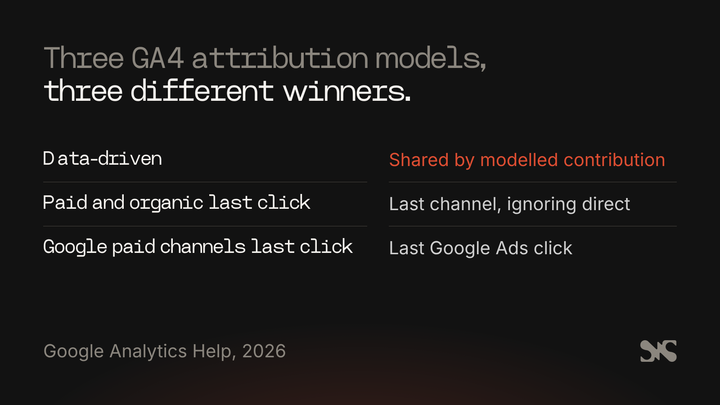
Data-driven attribution uses machine learning on converting and non-converting paths to share credit between touchpoints. Paid and organic last click gives all the credit to the last channel clicked before the key event, ignoring direct. Google paid channels last click gives it to the last Google Ads click, and falls back to paid and organic last click when there isn't one (Google Analytics Help, 2026).
The limits matter more than the models. GA4 sees website and app behavior, mostly from people who accepted analytics cookies, and it can't see the dark social conversations, peer recommendations, podcasts and sales calls that often decide a B2B purchase. Three habits keep attribution honest:
- Report pipeline and revenue by source from the CRM, not only key events from GA4, and say which system each number came from.
- Add a “How did you hear about us?” field to demo and sign-up forms. Self-reported answers catch what tracking misses.
- Use attribution to guide budget decisions, and back big calls with other evidence. Our handbook entry on attribution theater explains how teams fool themselves with tidy-looking reports.
How do consent and privacy affect marketing operations?
Consent rules decide which tags may run, which cookies may be set and which data may be sent to ad platforms. For a SaaS company selling into the UK and Europe, getting consent wrong means legal risk and data you can't use, so it belongs with whoever controls the tags.
In the UK, the Privacy and Electronic Communications Regulations (PECR) still require consent for most cookies and similar technologies, but the ICO's guidance, finalized on April 29, 2026 after changes made by the Data (Use and Access) Act, now explains a “statistical purposes” exception for analytics (ICO, 2026). It only applies when the sole purpose is collecting statistical information about how your service or website is used to improve it. You must give people clear information and a simple, free way to object, your analytics provider must act as a processor and only use the data to help you improve your service, and the exception doesn't cover online advertising (ICO, 2026). Ad tags and anything that links website activity to ads still need consent.
Google's consent mode is how your consent choices reach Google's tags, and it comes in two versions. In basic consent mode, Google tags are blocked until the user interacts with the consent banner.
In advanced consent mode, tags load with consent denied by default and send measurements without cookies until the user grants consent, which gives Google more to model conversions from (Google for Developers, 2026). Consent mode includes separate consent types for ad storage, ad user data, ad personalization and analytics storage.
One recent change to check: from June 15, 2026, Google Analytics uses consent mode settings in Google Ads as the single control for collecting Google Ads cookies and IDs, where previously the Google signals setting also played a part (Google Analytics Help, 2026). If your Google Ads and GA4 numbers drifted apart around that date, look there first.
A practical consent checklist for marketing ops:
- Run a cookie and tag audit of the website: what fires, before and after consent, on every key page.
- Use a consent management platform that supports consent mode and sends the user's choice to Google and to your other tags.
- Set every non-Google tag in Tag Manager to fire only with the right consent.
- Keep a record of which legal basis each tag relies on, and review it when you add a tool.
- Make sure form opt-ins for email are separate, unticked and recorded on the contact record.
This isn't legal advice. Check your set-up with whoever handles data protection in your company.
How is AI changing marketing operations?
AI is changing marketing operations mainly by giving people new ways to read, query and act on data they already have. The work of keeping that data clean and well defined becomes more important, because an AI tool asked a question about messy data gives a confident answer that's wrong.
Google now offers a Google Analytics MCP server that connects GA4 data to large language models and AI agents, so you can query reports in plain language and inspect property settings. It's read-only and can't change your Google Analytics settings (Google for Developers, 2026). Our step-by-step post on connecting Claude to GA4 via MCP shows what that looks like in practice, and our guide to AI marketing agents for B2B SaaS covers connecting the rest of your stack.
Where AI helps marketing ops most today:
- Answering ad hoc reporting questions without building a new dashboard.
- Spotting anomalies, such as a form that stopped sending leads or a tag that started firing twice.
- Drafting UTM conventions, naming rules, workflow logic and documentation for a person to check.
- Enriching and tidying records, with rules for what may be overwritten.
Keep a person in charge of anything that changes data or sends messages. Give AI tools read-only access first, write down what each one is allowed to do, and check its output against a report you already trust before you rely on it.
When should a SaaS company hire marketing ops or bring in help?
A SaaS company needs dedicated marketing operations once the cost of bad data and broken processes is bigger than the cost of a person or partner to fix them. The signs are usually clear before anyone says it out loud:
- Marketing and sales report different numbers for the same thing.
- Leads wait more than a day for a first response, or nobody can say how long they wait.
- Nobody can explain half the workflows in the marketing automation platform.
- Campaigns launch without UTM parameters or without a way to measure them.
- You're about to change CRM, website platform or analytics set-up.
There are three common routes. A first in-house marketing ops hire suits a company with steady campaign volume and a CRM worth looking after every day. A freelance consultant suits a defined project, like a HubSpot clean-up, a migration or a tracking rebuild. An agency suits work that needs several skills at once, such as CRM, website tracking and paid media together.
Whichever you choose, ask to see the documentation they leave behind, and how they handle access and changes in your systems. Our list of the best HubSpot consultants for B2B SaaS is a good place to start if HubSpot is your CRM.
A 90-day plan to get marketing operations started
A 90-day marketing operations plan works best in three blocks of roughly 30 days: understand what you have, fix what's broken, then automate and report. The order matters, because automating a broken process only makes it fail faster.
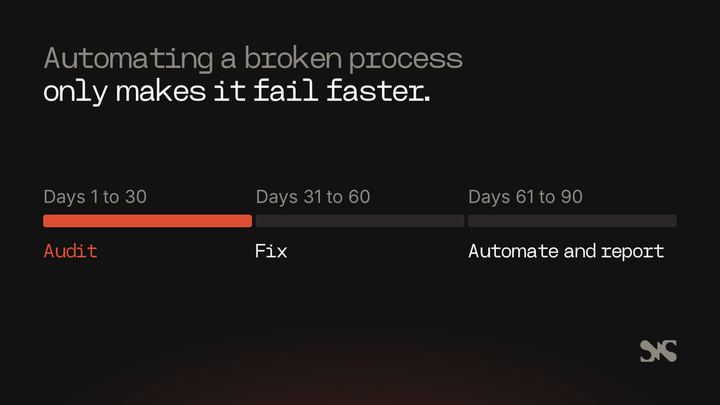
Days 1 to 30: audit
- List every tool, owner, cost and renewal date, and map how data moves between them.
- Test every form, sign-up and demo request end to end and note where records go missing.
- Audit GA4 key events and the Tag Manager container, and check what fires before and after consent.
- Collect the current definitions of lead, MQL, SQL and opportunity from both marketing and sales.
Days 31 to 60: fix
- Agree and write down lifecycle stage definitions and the MQL to SQL handover with sales.
- Fix broken forms, integrations and routing, and set up a test you can repeat monthly.
- Clean up duplicates and standardize key fields such as country, company size and job function.
- Tidy the key events list, set consent correctly on every tag, and agree a UTM convention.
Days 61 to 90: automate and report
- Build or rebuild lead scoring and nurture for leads sales hands back.
- Create one funnel report from the CRM that marketing and sales both use, with the source of each number stated.
- Add self-reported attribution to demo and sign-up forms.
- Write the marketing ops handbook and set a quarterly review of tools, scoring and definitions.
By day 90 you want one set of definitions, data people trust, and a weekly report that marketing and sales read together.
About SaaS Hackers
SaaS Hackers is a community of B2B SaaS specialists sharing hands-on insights, built by the marketers, strategists and builders who do the work. It publishes practical guides and top lists, and runs a directory of vetted B2B SaaS marketing agencies and experts.
If you'd rather bring in specialists to set up your CRM, tracking and reporting, browse our RevOps consultants and agencies for B2B SaaS and compare their services and scores.
FAQs
Some common questions, answered
What is B2B SaaS marketing operations?
B2B SaaS marketing operations is the function that runs the systems behind marketing in a software company. It owns the martech stack, data quality, the lead lifecycle and handover to sales, lead scoring, campaign set-up, measurement, attribution and consent, so that marketing decisions are based on numbers both marketing and sales trust.
What is the difference between marketing operations and RevOps?
Marketing operations covers the systems, data and processes for marketing, up to the point sales accepts a lead, plus measuring marketing's effect on pipeline. RevOps joins marketing, sales and customer success operations under shared systems and definitions, and owns the whole funnel, including deal stages, forecasting and renewals. Marketing ops often sits inside a RevOps team.
What tools does a SaaS marketing operations team need?
Most early-stage SaaS companies need four things: a CRM with marketing automation, a website CMS with forms that write straight to the CRM, GA4 with Google Tag Manager, and a consent management platform. Add enrichment, product analytics or attribution tools only when a specific job can't be done with the core stack.
What are key events in GA4?
Key events are GA4 events you mark as particularly important to your business, such as a demo request or trial sign-up. They replaced the old GA4 name of conversions. In GA4, a conversion now means a key event you have shared with Google Ads to measure and optimize ad campaigns, which needs a linked Google Ads account.
Do UK websites still need consent for analytics cookies?
Most cookies still need consent under PECR, but the ICO's 2026 guidance explains a statistical purposes exception for analytics used only to improve your website or service. You must explain it clearly, offer a simple free way to object, use your provider only as a processor, and it never covers advertising. Check your own set-up with your data protection lead.
When should a SaaS company hire a marketing ops person?
Hire or bring in marketing operations help when marketing and sales report different numbers, leads wait too long for a response, nobody can explain the automation workflows, or a CRM or website migration is coming. A freelancer suits a defined project, an agency suits mixed skills, and an in-house hire suits steady, ongoing volume.