






How to build a website with Claude Code that doesn't look awful
Claude Code can build a fast, accessible marketing site, but left to its defaults it builds the same site as everyone else. This guide shows how to give it your design system, your rules and checks it can't argue with, using the SaaS Hackers rebuild as the worked example.

Written by
SaaS Hackers- AI
- Claude
- Technology
- Conversion & Website
- Emerging Modern Challenges
- Guide

Quick answer: You can build a website with Claude Code that looks designed rather than generated, but only if you stop it falling back on its defaults. Give it a real design system as tokens, write your rules into a CLAUDE.md file and a spec, build in small phases a person signs off, and add checks for contrast, tokens, accessibility and speed that fail the build when something drifts.
Most marketers who try this get the same result. The first page arrives quickly and looks fine at first glance. Then you notice the Inter font, the purple gradient, the centered headline over two buttons and three identical cards, and you realize you've seen this exact site many times before.
This guide is for marketers and founders who want to build or rebuild a marketing site with Claude Code and end up with something that looks like their brand. It covers why AI-built sites look generic, what to give Claude before it writes a line, how to keep it honest while it builds, and how to replace an old site without losing search traffic. The case study throughout is saas-hackers.com itself, rebuilt from Webflow with Claude Code in November 2026. Every result quoted from that project comes from its own records.
Can you build a website with Claude Code that looks good?
Claude Code is an AI coding tool that reads your project, writes and edits the code, runs commands and checks its own work. For a marketing site that means it can set up the framework, build the components, connect a CMS and run the tests, while you decide what the site should be and whether each step is good enough.
Yes, if you do the right work around it. Claude Code is good at the engineering and fast at the repetitive parts of a build. It does not know your brand, your buyers or the decisions your team made in a meeting, and it will fill those gaps with the most common choice it has seen. The work that decides whether the site looks good is the work you do before and around the build: the design system, the written rules and the checks.
If you haven't yet decided what the site needs to do for your pipeline, start with our B2B SaaS website strategy guide. This guide assumes you know which pages you need and want to build them well.
Why do AI-built websites all look the same?
AI-built websites look the same because language models pick the most likely next choice, and the most likely choice in web design is the safe one. Anthropic calls this distributional convergence: safe design choices dominate the training data, so without direction the model samples from that high-probability center (Anthropic, 2025).
Anthropic's own frontend team describes the result plainly. Asked to build a landing page without guidance, a model “will almost always conform to Inter fonts, purple gradients on white backgrounds, and minimal animations” (Anthropic, 2025). Their point is that this undermines brand identity and makes AI-made interfaces easy to recognize and easy to dismiss.
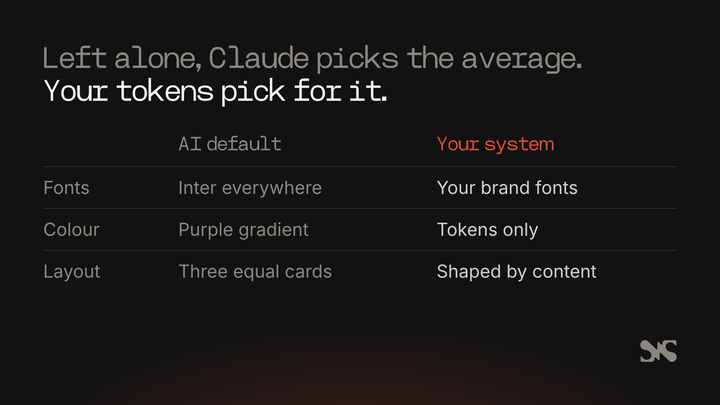
The tells are easy to spot once you know them:
- Inter, Roboto or system fonts everywhere, with weights that barely change between headings and body text
- Purple or violet gradients, and gradient-filled headline text
- A centered hero with a pill badge, a headline, a subhead and two buttons
- Three identical cards under the hero, whatever the content
- The same rounded corners and soft gray shadow on everything
- Emoji or generic line icons beside every point
The same research shows the way out. Claude is highly steerable: tell it which defaults to avoid and what to use instead, and the output improves straight away (Anthropic, 2025).
Anthropic packaged that guidance as a frontend design skill and a Claude Code plugin, and it notes that you can build your own skill around your company's design system. That last part is what matters for a business website.
General advice about “interesting fonts” gets you a different generic site. Your own design system gets you yours.
Start from a design system, not a prompt
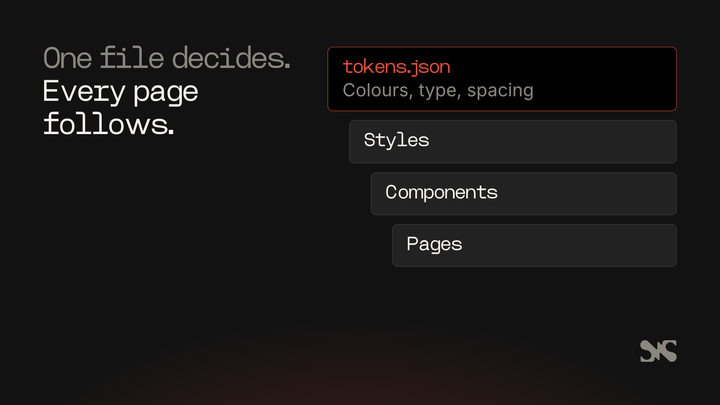
A design system for an AI build is a set of named decisions Claude can read: colors, fonts, type sizes, spacing, corner radius and breakpoints, each with a job. Written as design tokens in a file, they become the only values the site is allowed to use.
The difference from a brand guidelines PDF is that tokens are machine-readable. A PDF says your accent is orange. A token file says brand.flame is #df4e32 and is used for the logo, arrows, active filters and input focus, and nothing else. Claude can follow the second one exactly, and a script can check it did.
What a usable design system for a Claude Code build contains:
- Color tokens with jobs. Ground, text, headings, muted text, borders, one signal color, and the themes (for example a dark and a light theme) that pair them.
- Type. The brand fonts as files you're licensed to self-host, a type scale with real size jumps, and the weights each level uses.
- Spacing, radius and breakpoints. A spacing scale, a radius per role (buttons, cards, sections) and the screen widths the layout changes at.
- Components with one name each. A button, a card or a hero is called the same thing in the design file, the code and the CMS, so nobody has to translate.
Where does it come from? If you have a designer or a Figma library, export the tokens from there.
If you have an existing site you like, the tokens can be read from its stylesheet, which is what happened on the SaaS Hackers rebuild. If you have neither, pay a designer for this part before you build anything. A day of design decisions is cheaper than a site that looks like everyone else's.
One technical choice makes the system stick. If you use Tailwind CSS, don't import its default theme. Generate the theme from your token file instead, so the only colors, sizes and fonts that exist in the project are yours. Claude can't reach for a stock purple that isn't there.
How do you write the rules down for Claude?
Claude Code reads a file called CLAUDE.md at the start of every session, so it's where you put the rules for the project. A project CLAUDE.md lives in the repository and is shared with everyone who works on it through source control (Claude Code docs, 2026).
Anthropic's guidance on writing it is practical. Keep each CLAUDE.md under about 200 lines, because longer files cost more context and reduce how well Claude follows them.
Make instructions concrete enough to check: “Run npm test before committing“ rather than ”test your changes“. Group rules under headings, and remove ones that contradict each other (Claude Code docs, 2026).
You don't have to start from a blank page either: the /init command drafts a starting file from your codebase.
For a website build, the CLAUDE.md that works covers five things:
- What you're building and with what. The stack, the hosting and where the content lives.
- The never list. Things that must not happen: changing a live URL, committing secrets, adding a paid service or third-party script without asking, writing to the wrong CMS project.
- Standards. No colors, sizes or fonts outside the tokens. One component name everywhere. Static output by default. WCAG 2.2 AA. British or US English.
- Writing rules for any text Claude adds. Plain language, no invented copy, and a placeholder nobody could miss (the words COPY NEEDED in capitals, plus what's missing) where words don't exist yet.
- Commands. How to run the dev server, the build and each check. Anthropic's best practices call the command that runs your checks the single most useful line in the file (Claude Code docs, 2026).
CLAUDE.md is guidance, not enforcement. Claude treats it as context and can decide a guideline doesn't apply. For anything that must happen every time, such as running the formatter or never reading a secrets file, Claude Code offers hooks and permission rules that the tool applies itself (Claude Code docs, 2026).
Put the longer brief in a separate spec file. Anthropic suggests asking Claude to interview you until it could write the spec, saving it as SPEC.md, then starting a fresh session to build from it, so the build begins with a clean context and a written definition of done (Claude Code docs, 2026). For brand and design rules that only matter some of the time, a skill keeps them out of the way until they're needed; our explainer on Claude Skills for marketing teams covers how they work.
Build in small phases a person signs off
A website built with Claude Code goes wrong in the same way a website built by a junior developer goes wrong: too much at once, with nobody looking until the end. The fix is the same too. Split the build into phases, review each one, and don't start the next until the last is approved.
A phase order that works for a marketing site:
- Set-up. Framework, styling, CMS and hosting connected, with an empty page deploying to a preview link.
- Content model and migration. CMS schemas, and existing content moved across as drafts.
- Design system. Tokens, fonts and every component, shown on one catalog page.
- Templates and pages. Each page type built from the components and filled with real content.
- SEO. Head tags, structured data, sitemap, redirects and checks against the old site.
- Publishing. Previews, the editor workflow and anything that rebuilds the site when content changes.
Each phase ends with a pull request and a preview link a person can click through. The pull request says what was built, what was checked and what it found, what Claude assumed, and what's left. That last heading is where unresolved questions surface instead of being quietly guessed.
Why a component catalog matters
The catalog is one page that shows every component in every state: each button style, each card, the header open and closed, form fields with errors, every section block with sample content. It's where you sign off the look before any template uses it. Fixing a card once in the catalog is far cheaper than finding it wrong on 200 pages. Keep the catalog out of the sitemap and set it to noindex.
Look at the catalog at phone width as well as desktop. Most generic-looking AI builds fall apart on a phone first: text too small, cards too cramped, menus that overlap.
What checks keep an AI-built website honest?
The checks are what stop a good start drifting into a generic finish. Anthropic's best practices put it simply: Claude stops when the work looks done, so give it something that comes back pass or fail, and it can fix its own mistakes before you see them (Claude Code docs, 2026).
For a marketing site, these are the checks worth building in. Make the build itself run them, so a failure stops the deploy rather than adding to a to-do list.
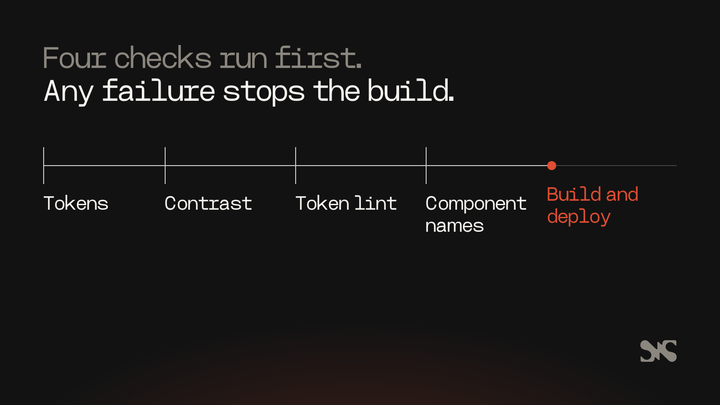
- Tokens up to date. The generated stylesheet matches the token file, so nobody edited one without the other.
- Contrast. Every text, form field and focus pair in every theme meets WCAG 2.2 AA. That's at least 4.5:1 for normal text and 3:1 for large text (W3C, 2023). The focus ring and the borders that mark a control need 3:1 too.
- Token lint. A script that fails on any color, size or font in the code that isn't a token: no hex codes, no
rgb(), no pixel sizes typed into a component, no font names. - Component names. Every section block in the CMS has a component of the same name, and the reverse.
- Accessibility scan. An automated scan such as axe on each page type, plus a keyboard check: can you reach and use every menu, filter and form without a mouse?
- Speed. Lighthouse on mobile for the homepage and the main templates, run more than once. Our explainer on Core Web Vitals covers what the speed scores measure.
- Layout at real widths. Screenshots or an overflow scan at phone, tablet and desktop widths, looking for text that spills out of its box.
Ask Claude for evidence each time: the command it ran and the output. “All checks pass” on its own tells you very little, and reading the output is faster than running it again yourself (Claude Code docs, 2026).
Then look at the pages with your own eyes. Automated checks catch what's measurable. They can't tell you a page looks like a template.
How do you replace an existing site without losing search traffic?
Replacing a live site is a migration, and the risk is losing rankings rather than looking bad. The rule that protects you is that every URL that exists on the old site keeps its exact address on the new one, or gets a permanent redirect to the right page.
Claude Code is well suited to the checking, because it's repetitive and exact. On a rebuild, set up three checks before you switch over:
- Route check: Every address in the old sitemap returns a 200 on the new preview, and an unknown address returns a 404.
- Parity check: For every address, compare the title, meta description, canonical, H1 and structured data with the live page, and fail on anything that's been lost.
- Redirect check: Every redirect the old platform held is recreated, chains are flattened and nothing redirects to a page that redirects again.
Don't let Claude change a slug “to tidy it up”. Put “never change a URL that exists on the live site” in the never list. Our SEO strategy guide covers the wider picture. If the site is large or the traffic matters a lot, an agency from our list of SEO migration agencies can own the migration plan while Claude does the build.
In practice: how SaaS Hackers was rebuilt with Claude Code
SaaS Hackers (run by Team 4) moved from Webflow to Astro, Tailwind CSS, TypeScript, Sanity and Netlify in November 2026, with Claude Code doing the build. The brief was deliberate about the look: rebuild the current design, no redesign. There was no Figma file or design system, so the design system was built from the live site.
That shaped the approach. The colors, fonts, spacing and radius were read from the live stylesheet into a token file, which ended up holding 26 color tokens and three themes (dark, black and light). The brand display font, Heming, is licensed for self-hosting, and Inter is open source, so both were self-hosted.
Tailwind's default theme wasn't imported, so the tokens were the only values available. The header, footer, cards, expert profile parts, form fields, post body and 14 section blocks were built with matching CMS blocks and shown in a component catalog.
The four design checks (tokens, contrast, token lint and component names) run at the start of every build and stop it if any fail. The components were signed off at phone and desktop width before any template used them.
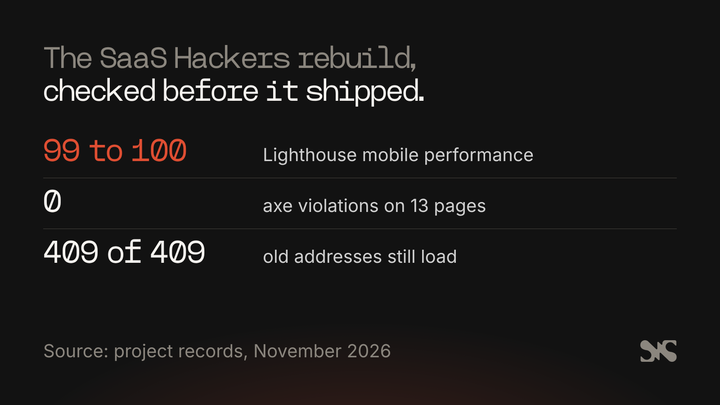
The project's own records show how it held up:
- axe found 0 violations on 13 pages when the templates were finished.
- All 409 in-scope addresses returned a 200 on the preview at the same stage.
- All 409 addresses beat the live Webflow pages on the parity check (title, description, canonical, H1 and schema), with no drops.
- Lighthouse mobile on production, three runs each on the English and German homepage, a post and an expert profile, scored 99 to 100 for performance and 100 for accessibility and best practices.
- An overflow scan of 11 page types in 7 languages at 4 screen widths found no problems.
What made the difference was simple. Claude never had to choose a color or a font, because the token file had already chosen. And a person reviewed every phase before the next one started, so problems were found in the catalog rather than on live pages. The work Claude did faster than a team could was the repetitive part: content migration, the 134 redirects in place by launch, and running the same checks again after every change. How the site runs day to day, with its agents and guard rails, is in our guide to the Claude Code tech stack for an agentic website.
Common mistakes, and how to avoid them
Most failed AI website builds fail for one of a handful of reasons. Each has a simple fix.
Starting with “build me a homepage”. Claude fills every gap with a default, and the homepage sets the look for everything after it. Write the design system and the CLAUDE.md first, then build the components, then the pages.
Describing the brand in adjectives. “Bold, modern, trustworthy” means nothing a model can act on. Give it tokens, font files and a screenshot of a page you like. Anthropic's docs suggest pasting the design screenshot straight into the prompt.
Building everything in one session. Long sessions lose track of early decisions. Work in phases, start fresh sessions from the spec and keep each change small enough to review.
Trusting “done”. Claude reports what it believes. Make the build run the checks, ask for the output, and look at the preview at phone width yourself before you approve anything.
Letting copy appear from nowhere. An AI build will write plausible headlines and testimonials to fill space. Ban invented copy in CLAUDE.md and use visible placeholders, so nothing fake reaches the live site. Our guide to using Claude for copywriting covers writing the real copy.
When should you bring in a designer or an agency?
Claude Code replaces a lot of build time. It doesn't replace design judgment. Bring in a designer when you have no design system, when the brand itself needs work, or when the site is the main way buyers judge you and “fine” isn't good enough.
A sensible split is to pay a designer for the system and the key page designs, then let Claude Code build to them under the checks above. A designer also gives you something to compare against: a mockup Claude can be checked against beats a description every time. Browse our list of web designers for B2B SaaS brands for freelancers who can do this part.
Bring in an agency when you need the whole thing owned: strategy, design, build, migration and someone accountable when it breaks. Ask how they use AI in their build process and which checks run before anything goes live. If you'd rather hand the whole project over, compare the top web design agencies for B2B SaaS before you brief anyone.
About SaaS Hackers
SaaS Hackers is a community of B2B SaaS specialists sharing hands-on insights, built by the doers behind the growth. It publishes practical guides, templates and a hand-picked directory of agencies and experts with proven experience in B2B SaaS digital marketing. SaaS Hackers is run by Team 4, and this site was rebuilt with Claude Code using the approach described in this guide.
FAQs
Some common questions, answered
Can Claude Code build a whole website?
Yes. Claude Code can set up the framework, build components and templates, connect a CMS, migrate content and run checks. What it can't supply is your brand, your buyers' needs or your team's decisions. Give it a design system, a written spec and pass or fail checks, and have a person review each phase before the next one starts.
Why does my AI-generated website look generic?
Language models pick the most common choice when nothing tells them otherwise, and the most common web design choices are Inter fonts, purple gradients, centered heroes and three identical cards. Anthropic calls this distributional convergence. The fix is to give Claude your own design tokens, fonts and components, and to ban values outside them.
What should go in a CLAUDE.md file for a website project?
Include what you're building and the stack, a list of things that must never happen, design and accessibility standards, rules for any text Claude writes, and the commands that run the dev server, the build and each check. Keep it under about 200 lines, make each rule specific enough to check, and move long briefs into a separate spec file.
Do I still need a designer if I use Claude Code?
Usually, yes, for the design system and key page designs. Claude Code builds well to a clear system but fills gaps with generic defaults. A designer's tokens, fonts and mockups give Claude something exact to build against and give you something to check the result against. Claude Code then saves most of the build time.
How do I stop Claude Code changing my URLs during a rebuild?
Write “never change a URL that exists on the live site” into CLAUDE.md, then back it up with checks. A route check confirms every old address returns a 200 on the new site, a parity check compares titles, descriptions and headings with the live pages, and a redirect check confirms every old redirect still works.